Calculating the approximate phase of the moon on a range of devices
Tuesday, 7th April 2026
Calculating the phase of the moon always struck me as a fun little program for a calculator, and with the current Artemis II mission it seemed like as good a time as any to look at a few example programs for this on a range of different calculators and pocket computers.
Sharp PC-1211
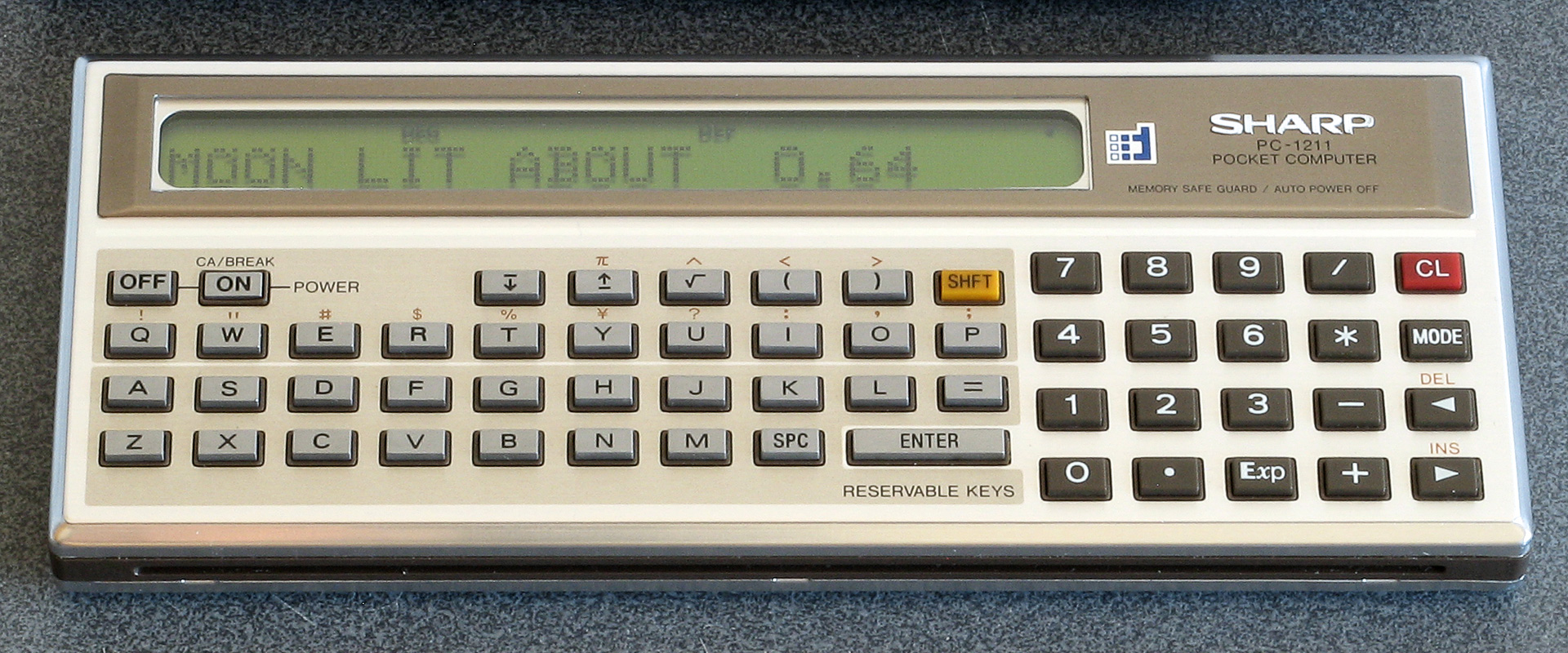
I copied the following program from the book 119 Practical Programs for the TRS-80 Pocket Computer and it forms the basis of most of the subsequent programs:
  100 "MOON"INPUT "DATE M?",M,"D?",D,"Y?",Y: GOSUB "DJ"
  110 M=(J+4.867)/29.53058:M=2*(M-INT M)-1:N=ABS M
  120 USING "##.##": PRINT "MOON LIT ABOUT ";N
  130 Z$="NEW": IF M>0 LET Z$="FULL"
  140 PRINT "HEADED FOR A ";Z$;" MOON.": END
  900 "DJ"J=INT (365.2422Y+30.44*(M-1)+D+1):N=M-2+12*(M<3)
  905 Z=Y-(M<3):E=INT (Z/100):Z=Z-100E
  910 W=INT (2.61N-.2)+D+Z+INT (Z/4)+INT (E/4)-2E
  915 W=W-7*INT (W/7):X=J-7*INT (J/7)
  920 J=J-X+W-7*(X<W)+1721061: RETURN
The program has two parts; the first is to convert a date from its year, month and day components into a Julian day number which it does via the subroutine DJ. It then calculates the phase of the moon by adding an offset (4.867 in this case) and dividing by 29.53058, the length of the synodic month (lunar cycle) in days. The fractional part of the result of this calculation corresponds to the phase of the moon, and by multiplying by two and subtracting one you can get a value roughly corresponding to how illuminated the moon is on a particular date and whether it's waxing (heading for a full moon) or waning (heading for a new moon).
Incidentally, the program listing printed in the book does have a bug: line 130 just checks IF M instead of IF M>0, and so the program will nearly always report a waxing moon (heading for a full moon). This is corrected in the version of the code shown above.
Sharp PC-1500
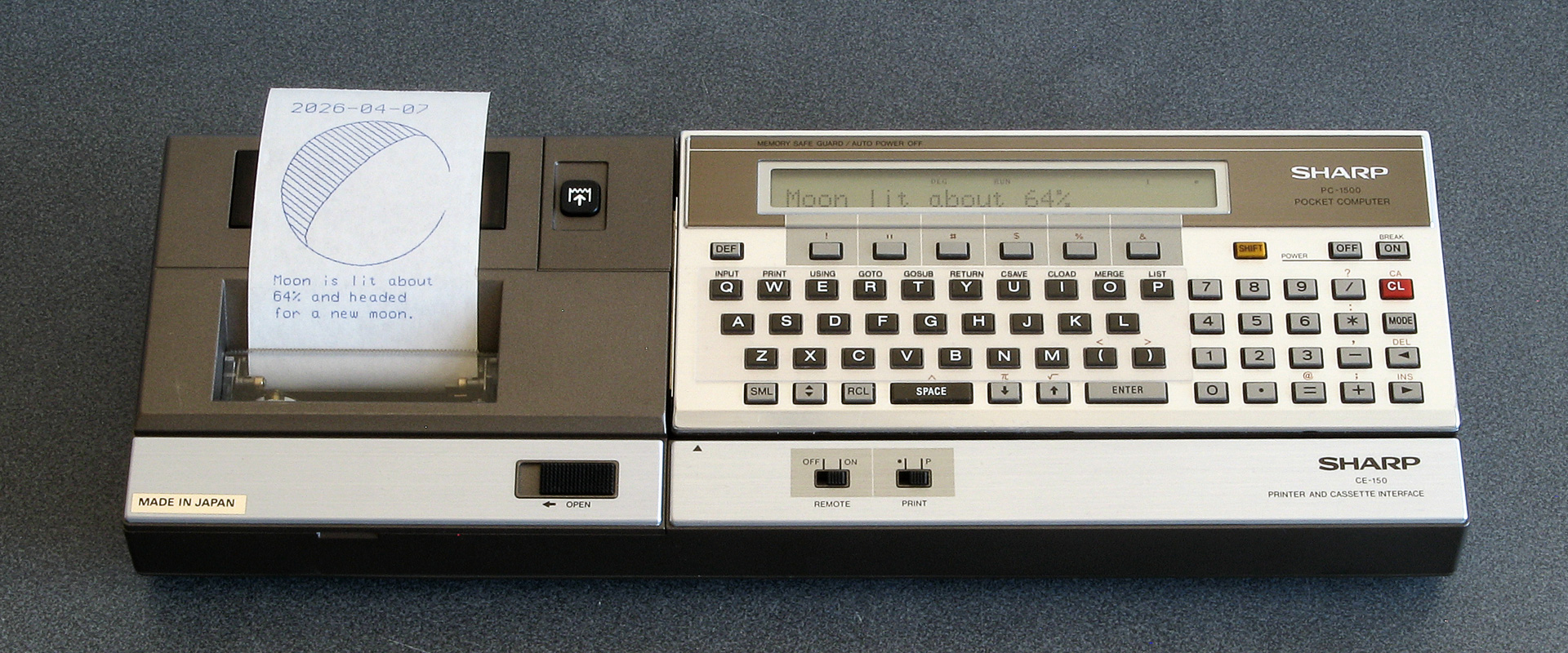
The next page of the book where I copied the PC-1211 listing from showed a graphical representation of the moon's phase which I thought would be fun to replicate, though as the PC-1211's printer doesn't support graphics it would be a very crude representation indeed. Fortunately, the PC-1500's plotter allows for graphical output, so I added an optional plotting routine to the above program as well as some other niceties like automatically populating the month and day fields with the value from the real-time clock:
   30 T=TIME :Y=2000:M=INT (T/1E4):T=T-M*1E4:D=INT (T/1E2)
   40 L=-50
   50 WAIT 0
   60 CLS : PRINT "Year (";STR$ Y;") ";: INPUT Y
   70 CLS : PRINT "Month (";STR$ M;") ";: INPUT M
   80 CLS : PRINT "Day (";STR$ D;") ";: INPUT D
   90 CLS : WAIT
  110 J=INT (365.2422*Y+30.44*(M-1)+D+1)
  120 N=M-2+12*(M<3)
  130 Z=Y-(M<3)
  140 E=INT (Z/100)
  150 Z=Z-100*E
  160 W=INT (2.61*N-.2)+D+Z+INT (Z/4)+INT (E/4)-2*E
  170 W=W-7*INT (W/7)
  180 X=J-7*INT (J/7)
  190 J=J-X+W-7*(X<W)+1721061
  210 P=(J+4.867)/29.53058
  220 P=2*(P-INT P)-1
  230 N=ABS P
  240 Q=INT (N*100+.5)
  250 CLS : PRINT "Moon lit about";Q;"%"
  260 Z$="full": IF P<0 LET Z$="new"
  270 CLS : PRINT "Headed for a ";Z$;" moon."
  290 IF PEEK &A000<>&C0 END
  300 WAIT 0:P$="Y": PRINT "Print output (Y/N) ";: INPUT P$
  310 IF P$<>"Y" END
  320 "MPRINT" CLS : PRINT "Latitude (";STR$ L;") ";: INPUT L
  330 IF L<-90 LET L=-90
  340 IF L>90 LET L=90
  360 CLS : PRINT "Printing...": WAIT
  380 M$=STR$ M: IF M<10 LET M$="0"+M$
  390 D$=STR$ D: IF D<10 LET D$="0"+D$
  400 TEXT : CSIZE 3: LPRINT STR$ Y;"-";M$;"-";D$
  410 GRAPH : GLCURSOR (216/2,-216/2+15): SORGN :R=108: DEGREE
  420 C=9: FOR A=0 TO 360 STEP 6
  430 LINE -(R*SIN (A),R*COS (A)),C
  440 C=0: NEXT A
  450 V=N*2:C0=9:C1=0
  460 IF P>=0 LET V=2-V:C0=0:C1=9
  470 FOR S=1 TO 2:C=9
  480 FOR I=-R TO R STEP 8
  490 XO=I*COS (-L):YO=I*SIN (-L)
  500 W=√(R*R-I*I)
  510 XN=W*SIN (L):YN=W*COS (L)
  520 X=XO-XN+V*XN:Y=YO-YN+V*YN
  530 IF S=1 LINE -(X,Y),C:C=0
  540 IF S=2 GLCURSOR (XO-XN,YO-YN): LINE -(X,Y),C0: LINE -(XO+XN,YO+YN),C1
  550 NEXT I: NEXT S
  560 GLCURSOR (-216/2,-216/2-25): SORGN
  710 TEXT : CSIZE 2: LPRINT "Moon is lit about"
  720 LPRINT STR$ Q;"% and headed"
  730 LPRINT "for a ";Z$;" moon."
  740 LF 3: END
The program also prompts for latitude to rotate the drawing appropriately – the moon appears to fill with light from the right to the left in the Northern hemisphere, from top to bottom at the equator and from the left to the right in the Southern hemisphere.
HP-12C
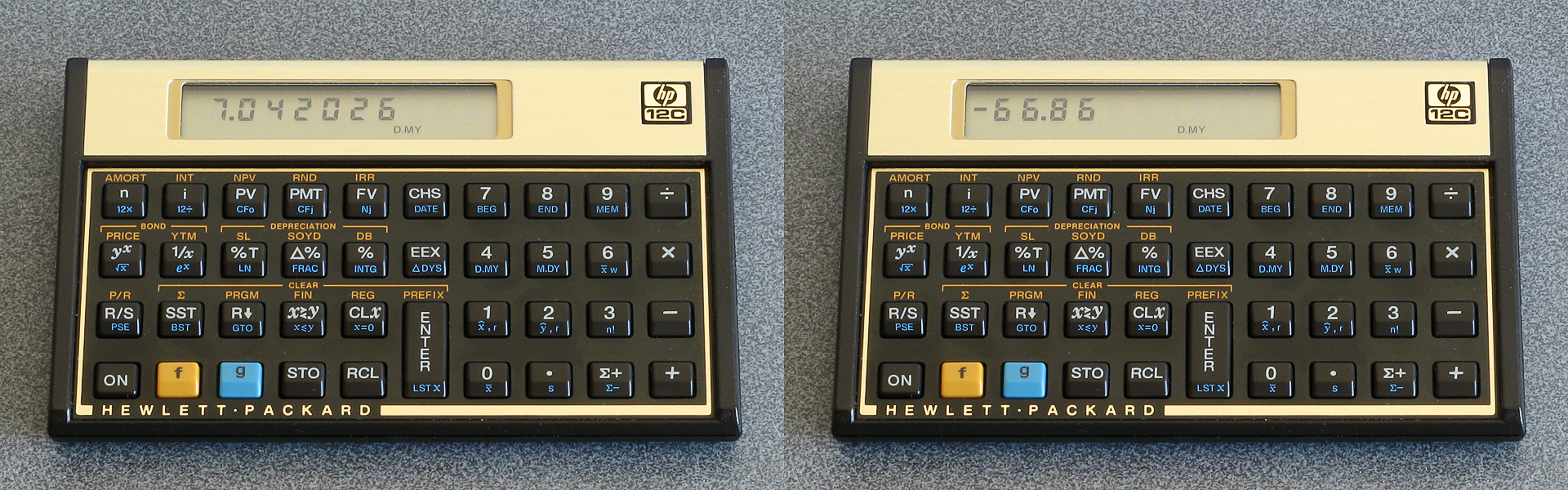
This calculator is really designed for financial applications but it is keystroke programmable and so a phase of moon calculation program would be a good learning project. Fortunately it can already calculate the number of days difference between two dates, so that would save having to write a program to calculate the Julian day number.
| Step | Key | Display | Comment |
|---|---|---|---|
| 01 | ENTER | 36 | Enter the current on-screen value onto the stack. |
| 02 | 1 | 1 | Enter "1.012" (1st January 2000). |
| 03 | . | 48 | |
| 04 | 0 | 0 | |
| 05 | 1 | 1 | |
| 06 | 2 | 2 | |
| 07 | g ΔDYS | 43 26 | Calculate number of days between 1st January 2000 and the submitted date. |
| 08 | CHS | 16 | Change sign to get the number of days after 1st January 2000. |
| 09 | 2 | 2 | Enter "20.195" (offset to 21st January 2000, 04:41). |
| 10 | 0 | 0 | |
| 11 | . | 48 | |
| 12 | 1 | 1 | |
| 13 | 9 | 9 | |
| 14 | 5 | 5 | |
| 15 | - | 30 | Subtract to get the number of days since the full moon. |
| 16 | 2 | 2 | Enter "29.53059" (synodic month, lunar cycle duration in days). |
| 17 | 9 | 9 | |
| 18 | . | 48 | |
| 19 | 5 | 5 | |
| 20 | 3 | 3 | |
| 21 | 0 | 0 | |
| 22 | 5 | 5 | |
| 23 | 9 | 9 | |
| 24 | ÷ | 10 | Divide to get lunar phase. |
| 25 | g FRAC | 43 24 | Extract the fractional part. |
| 26 | 1 | 1 | Add 1. |
| 27 | + | 40 | |
| 28 | g FRAC | 43 24 | Extract fractional part again (corrects negative values). |
| 29 | 2 | 2 | Multiply by 2 (value in range 0 to 2). |
| 30 | × | 20 | |
| 31 | 1 | 1 | Subtract one (value in range -1 to +1). |
| 32 | - | 30 | |
| 33 | ENTER | 36 | Enter result onto the stack (Y). |
| 34 | 1 | 1 | Enter 1 into X. |
| 35 | x⇔y | 34 | Swap so X=result, Y=1. |
| 36 | %T | 23 | Express X (result) as a percentage of Y (1). |
| 37 | g GTO 00 | 43,33 00 | End program. |
Dates on the HP-12C are represented as decimal values, either MM.DDYYYY or DD.MMYYYY depending on the current calculator mode. To keep things simple, rather than calculate the correct Julian day number the number of days since the first of January 2000 is used as the reference as this can be represented as 1.012 in either mode.
This change of date meant that the offset from the Julian day number (previously 4.867) could no longer be used. As the range of moon phases (0 to 1) are mapped to being from full to full (-100% to +100%) the 0 reference value also needs to be a full moon. I found a list of moon phases for the year 2000 which put a full moon at 04:41 on 21st January, so the offset was set to 20.195 – 20 days after the 1st January is the 21st, and 04:41 is (4+(41/60))/24=0.195 hours into the day.
One other very minor change from previous programs is the use of 29.53059 as this is a closer approximation than 29.53058, but in the grand scheme of things it doesn't make much difference to the accuracy. The program can be run by typing in the desired date (e.g. 7.042026) and pressing the R/S key.
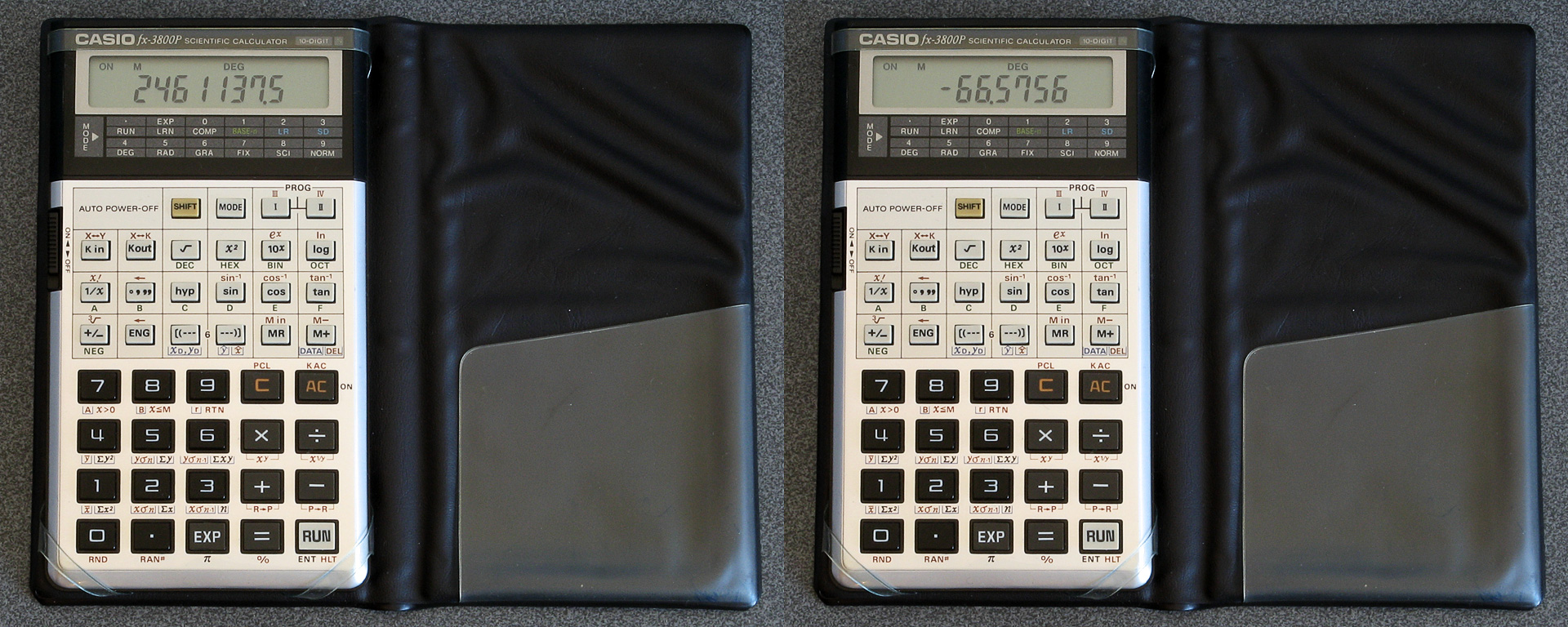
Casio fx-3800P
This is another keystroke programmable calculator, though life is made a little more difficult for us compared to the HP-12C as it doesn't have a built-in function to compute the number of days between two dates. One complication with adapting date computation algorithms to scientific calculators is that they often lack functions to truncate values to integers, and even if they do have a way to round a number (e.g. by switching to a mode that only shows a certain number of fixed decimal places and using a "modify" key to convert the displayed number to the stored one) they sometimes don't allow mode switches mid-program.
Fortunately, the Casio fx-3800P will store mode changes in its programs. Even better, you can switch between different numerical bases and the value will be truncated (not rounded) without raising an error which is the behaviour we want when handling date calculations, and when in this BASE-n mode calculations are carried out using integer division and multiplication which suits the algorithm perfectly.
The program is split into two parts: PROG I converts a date (stored in constant registers K1=year, K2=month, K3=day) into the Julian day number and stores the result in the memory register M. The second part, PROG II, converts the Julian day number stored in M into the approximate phase of the moon.
PROG I is adapted from Julian Day Numbers by Bill Jefferys, and is as follows:
| Keys | Comment |
| 1 Kin - 1 | Subtract 1 from year. |
| 12 Kin + 2 | Add 12 to month. |
| 15 - Kout 2 = | Check if month is in valid range. |
| x>0 | If not, loop back to start. |
| 1 Kin + 1 | Add 1 back to year. |
| 12 Kin - 2 | Subtract 12 back from month. |
| Kout 1 + 4716 = × 365.25 = | Base of Julian day number based on current year. |
| MODE 1 DEC MODE 0 Min | Truncate to an integer and store in M. |
| Kout 2 + 1 = × 30.6001 = | Offset Julian day number by value from month number. |
| MODE 1 M+ | Truncate to an integer and add to M. |
| Kout 1 ÷ 100 = M- | Account for centuries not being leap years. |
| Kout 1 ÷ 400 = M+ | Account for special case century leap years. |
| Kout 3 M+ | Offset Julian day number by the day of the month. |
| Kout 2 ÷ 13 = Kin + 1 | Restore original year if we shifted it back. |
| Kout 2 ÷ 13 × 12 = Kin - 2 | Restore original month if we shifted it forward. |
| MODE 0 | Switch back to COMP for floating point. |
| MR - 1522.5 = Min | Subtract offset to get Julian day number. |
PROG II is somewhat simpler, and follows the same sort of logic as previous programs:
| Keys | Comment |
| MR + 5.867 = ÷ 29.53059 = | Add Julian day offset and divide by synodic month. |
| Kin 4 | Store phase in K4. |
| MODE 1 + 0 = MODE 0 | Truncate phase to an integer. |
| Kin - 4 | Subtract from K4 to get fractional part of phase. |
| 200 × Kout 4 - 100 = | Convert to range -100 to +100. |
As mentioned above the programs make fairly heavy use of mode switching to truncate values to integers. Program flow control is very limited on these programmable scientific calculators, usually only permitting a jump back to the start of the program based on a certain condition – hence the slightly clumsy month/year adjustment at the start and end of PROG I.
The Julian day number calculation returns a value that is 0.5 smaller than the value returned by the PC-1211 program that was the basis for most of the other programs (e.g. for 7th April 2026 the Bill Jefferys algorithm returns the correct 2461137.5, the algorithm in the PC-1211 program returns 2461138). To compensate for this the offset used to calculate the current phase of the moon is made 1 larger; not 0.5, as through some experimentation a value of 1 produced results that more closely matched a lunar phase calculator I found elsewhere.
That said, none of the programs above line up particularly well with any other lunar phase calendar, and if you search through days to find when the new moon, full moon and quarters are based on the values closest to 0%, 50% and 100% you'll often find yourself a day off to one side or the other. A more accurate program would be useful, which brings me to the final and most sophisticated program.
Sharp PC-1251
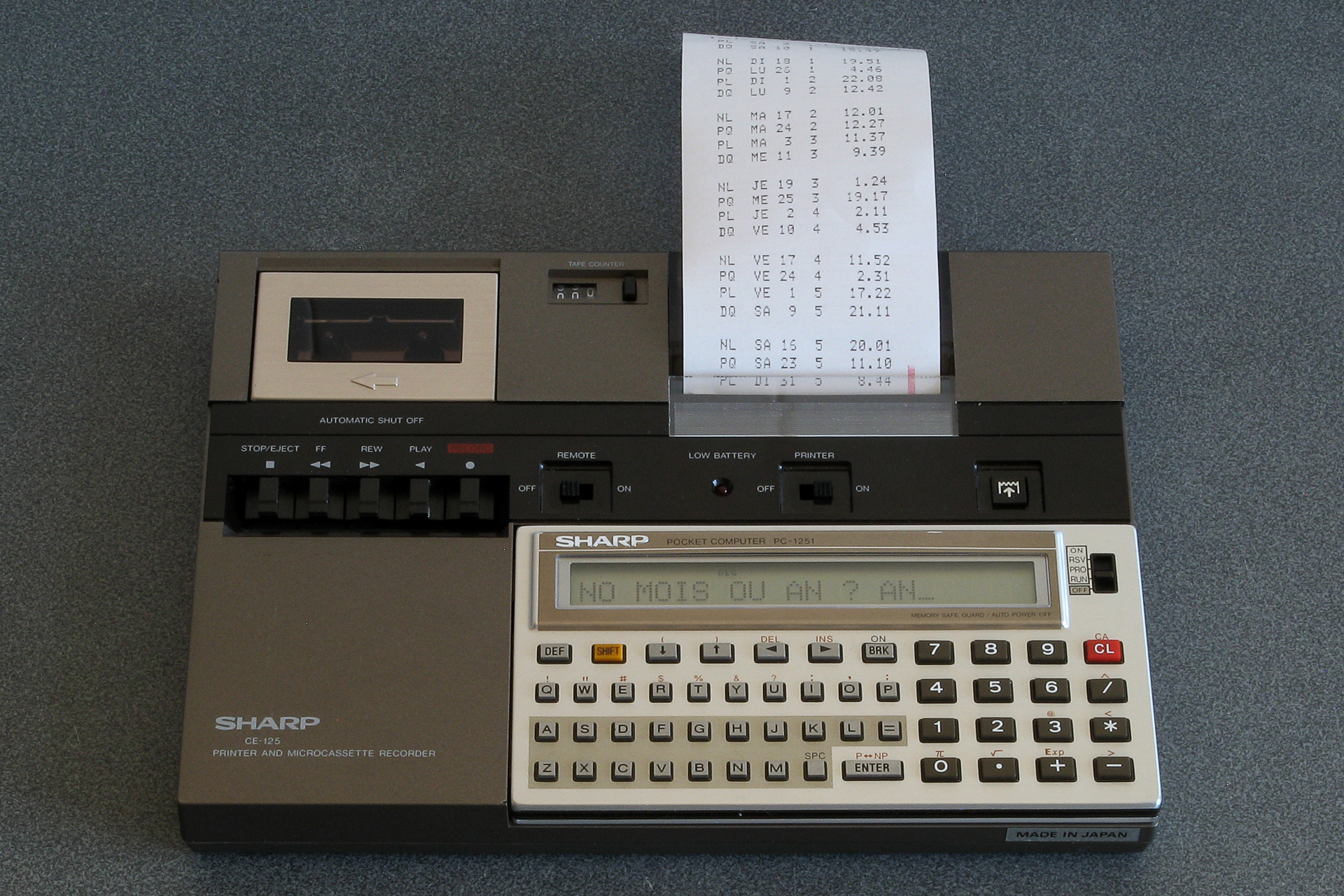
When leafing through old issues of La revue des Sharpentiers, a French publication about all things Sharp from the 1980s, I found an interesting program for the PC-1261: Les phases de la lune.
This program can produce an accurate calendar of moon phases, showing the dates and times of the new moon, full moon and quarters on a month-by-month basis. The article goes into detail about how it works, and I was keen to try it, but unfortunately I do not own a PC-1261! The closest machine I have is the PC-1251, as that matches the 24-column display and printer. However, there are some troublesome differences; the PC-1251 only has a single-line display, and so the PC-1261's code would need to have anything referring to the second line of the display adjusted or removed. A more significant issue is variable names; the PC-1261 supports two-character variable names, whereas the PC-1251 only supports a single character for its variable names.
I typed in the PC-1261 program and made a list of the two-character variable names it used along with a list of the single-character variable names it does not use. There were too many two-character names to fit in the space left over, so I had to make some further adjustments to reduce variable usage such as reusing the same variable in different places for different purposes or reordering code to avoid needing to store a value in an intermediate variable.
    1 "A": PRINT =LPRINT : GOTO 5
    2 "Z": PRINT =PRINT : GOTO 5
    3 REM PHASES DE LA LUNE*J.HERY D APRES J.MEEUS* EDI.20/11/85
    5 CLEAR : WAIT 100: DEGREE :U=0: DIM M$(12)*9,L$(7)*2: RESTORE
    7 FOR I=1 TO 12: READ M$(I): NEXT I
   10 FOR I=1 TO 7: READ L$(I): NEXT I
   20 PRINT "**PHASES DE LA LUNE**"
   25 INPUT "ANNEE ? ";Y: INPUT "NO MOIS OU AN ? ";S$:Z=Y
   30 G=1: IF Y<1583 LET G=0
   35 USING "#####": PRINT "AN:";Y: IF S$<>"AN"PRINT "MOIS: ";M$(VAL S$)
   40 PRINT " PH.   DATE    TU.(H.M)": PRINT ":--:----------:--------:": WAIT
   45 K=INT ((Y-1900)*12.3685)
   50 T=(Y-1899.5)/100
   60 I=2415020+29K
   65 L=.0001178TT-.000000155TTT
   70 L=L+.75933+.53058868K
   75 L=L+.00033*SIN (166.56+132.87T-.009173TT)
   80 L=L-.000837T-.000335TT
   85 N=.08084821133K
   90 N=360*(N-INT N)+359.2242
   95 N=N-.0000333TT
  100 N=N-.00000347TTT
  105 O=.07171366128K
  110 O=360*(O-INT O)+306.0253
  115 O=O+.0107306TT
  120 O=O+.00001236TTT
  125 V=.08519585128K
  130 V=360*(V-INT V)+21.2964
  135 V=V-.0016528TT-.00000239TTT
  140 K=4*(VAL S$-1): IF S$="AN"LET K=0
  145 FOR K=K TO 53
  150 J=I+7K:F=L+.38264717K
  160 P=N+K/4*29.10535608
  165 Q=O+K/4*385.81691806
  170 W=V+K/4*390.67050646
  180 IF U=0 OR U=1 GOSUB 300
  185 IF U=.5 OR U=1.5 GOSUB 340
  190 F=F+.5/1440
  195 J=J+INT F:F=F-INT F
  197 R=J+F+1.5:R=R-7*INT (R/7)+1
  200 GOSUB 400
  205 IF Y<Z GOTO 260
  210 IF S$="AN" OR M=VAL S$ GOTO 220
  215 GOTO 255
  220 IF U=0 PRINT "":P$=" NL"
  230 IF U=.5 LET P$=" PQ"
  235 IF U=1 LET P$=" PL"
  240 IF U=1.5 LET P$=" DQ"
  245 PRINT P$;"  ";L$(R);USING "###";D;M;USING "#####.##";DMS H
  255 IF M>VAL S$ AND S$<>"AN"GOTO 270
  260 U=U+.5: IF U=2 LET U=0
  265 NEXT K
  270 PRINT "": END
  300 F=F-.4068*SIN Q
  305 F=F+(.1734-.000393T)*SIN P
  310 F=F+.0161*SIN (2Q)-.0004*SIN (3Q)
  315 F=F+.0104*SIN (2W)+.0004*SIN (2W+P)
  320 F=F-.0074*SIN (P-Q)-.0004*SIN (2W-P)
  325 F=F-.0051*SIN (P+Q)-.0006*SIN (2W+Q)
  330 F=F+.0021*SIN (2P)+.0005*SIN (P+2Q)
  335 F=F+.0010*SIN (2W-Q): RETURN
  340 F=F+(.1721-.0004T)*SIN P+.0021*SIN (2P)
  345 F=F-.6280*SIN Q+.0089*SIN (2Q)
  350 F=F-.0004*SIN (3Q)+.0079*SIN (2W)
  355 F=F-.0119*SIN (P+Q)-.0047*SIN (P-Q)
  360 F=F+.0003*SIN (2W+P)-.0004*SIN (2W-P)
  365 F=F-.0006*SIN (2W+Q)+.0021*SIN (2W-Q)
  370 F=F+.0003*SIN (P+2Q)+.0004*SIN (P-2Q)-.0003*SIN (2P+Q)
  380 F=F+SGN (1-U)*(.0028-.0004*COS P+.0003*COS Q)
  385 RETURN
  400 F=F+.5
  405 IF F<1 GOTO 415
  410 F=F-1:J=J+1
  415 IF G=1 GOTO 425
  420 A=J: GOTO 435
  425 B=INT ((J/36524.25)-51.12264)
  430 A=J+1+B-INT (B/4)
  435 B=A+1524
  440 C=INT ((B/365.25)-.3343)
  445 D=INT (365.25C)
  450 E=INT ((B-D)/30.61)
  455 D=B-D-INT (30.61E)+F
  460 M=E-1:Y=C-4716
  465 IF E>13.5 LET M=M-12
  470 IF M<2.5 LET Y=Y+1
  475 H=24*(D-INT D):D=INT D
  480 RETURN
  500 DATA "JANVIER","FEVRIER","MARS","AVRIL"
  510 DATA "MAI","JUIN","JUILIET","AOUT"
  520 DATA "SEPTEMBRE","OCTOBRE","NOVEMBRE","DECEMBRE"
  530 DATA "DI","LU","MA","ME","JE","VE","SA"
Another optimisation is related to the PC-1251's lack of support for long variable names; it supports implicit multiplication in certain situations, for example 2*A can be written as 2A. Whereas the original program used T2 and T3 to store the values of T² and T³ respectively, I could instead use TT and TTT in their place and save having to use up more previous variable names. I could also replace instances of Q+Q+Q with 3Q or W+W with 2W. After making these changes the program was a few bytes smaller and had enough spare single-character variable names free to use for the remaining two-character names; the end result is somewhat harder to read, but it does run on the PC-1251 and matches the output of the PC-1261 original.
Sharp PC-1245
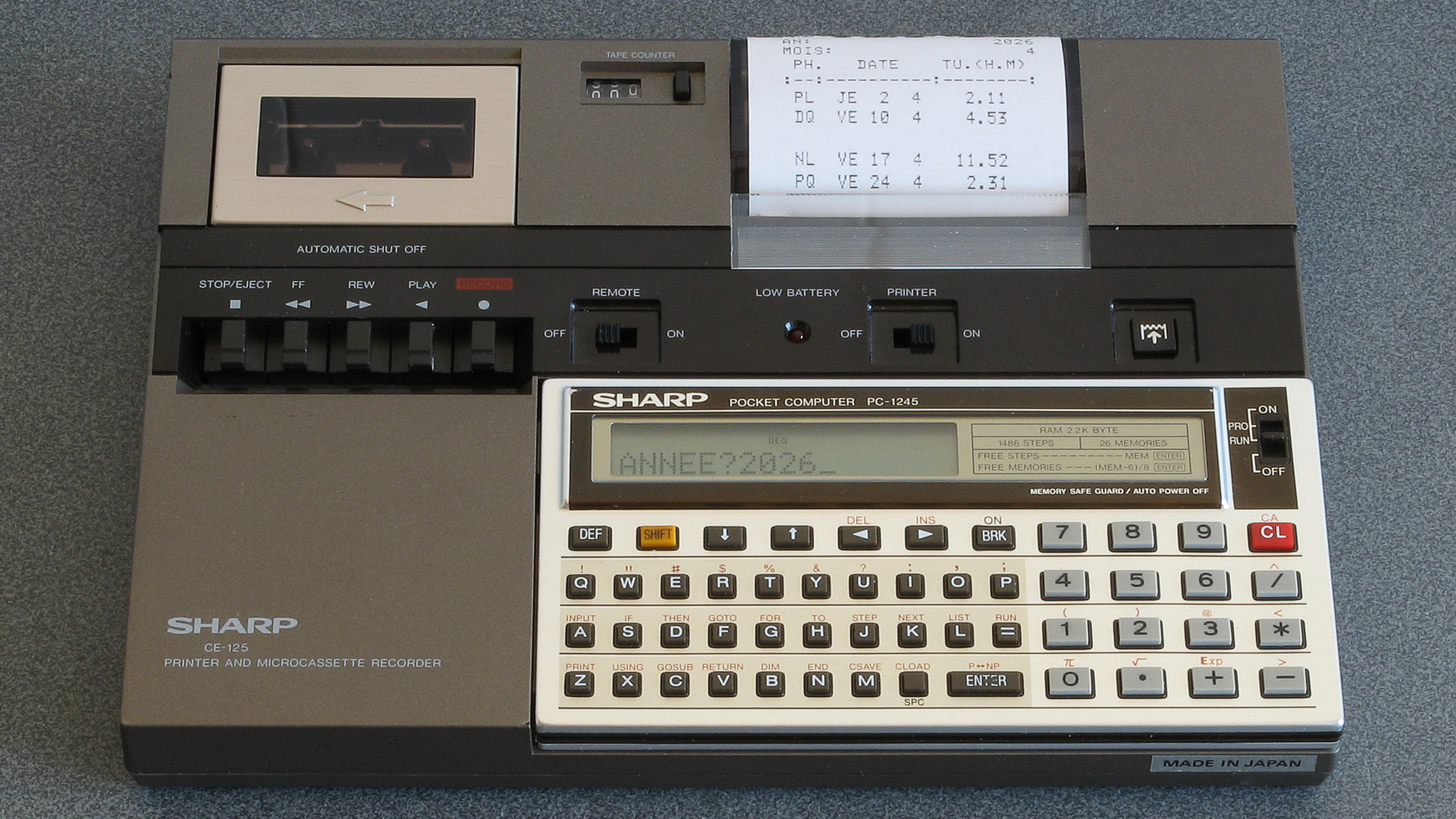
A very similar computer to the Sharp PC-1251 is the PC-1245. This can drive the same 24-column printer, however its display is only 16 characters wide. A bigger problem, however, is the amount of available RAM: the PC-1245 only has 1486 bytes free for a program and dynamically-named variables, and the PC-1251 program is 2112 bytes in length. Slimming the program down to fit was a considerable challenge, but here are some of the changes that were made:
- Dynamically-allocated variables were removed; a month number is shown instead of a name, and weekday names come from indexing into a string instead of storing them in an array.
- Where possible, multiple lines of code were condensed into single lines of code separated by colons.
- Constant variables with long sequences of zeroes at the start were replaced with scientific notation where it saved space (e.g. .000000155 to 155𝐄-9).
- The user-supplied month number is stored in a numeric variable S with a value of 0 to print a year instead of a string with a value of "AN" – this saves a lot of comparisons and use of VAL to convert back to a number where required.
- Parentheses around function arguments were removed where not required.
- Conditions were simplified or removed if possible, for example G=1: IF Y<1583 LET G=0 becomes G=Y>1582.
- Decorative text and comments were condensed or removed entirely.
- Support for outputting to the screen was removed; information would be cut off due to the narrower screen, so making it printer-only felt like an acceptable loss.
The resulting code is much harder to read, but the resulting program is not too much of a compromise from the original in my opinion. It comes to exactly 1486 bytes, which means it completely fills the computer's memory.
   25 "A"CLEAR : INPUT "ANNEE?";Y: INPUT "MOIS?";S
   35 Z=Y:G=Y>1582: USING "#####": LPRINT "AN:",Y: IF S LPRINT "MOIS:",S
   40 LPRINT " PH.   DATE    TU.(H.M)": LPRINT ":--:----------:--------:"
   45 K=INT ((Y-1900)*12.3685):T=(Y-1899.5)/100:I=2415020+29K
   65 L=1178€-7TT-155€-9TTT+.75933+.53058868K
   75 L=L+33€-5*SIN (166.56+132.87T-.009173TT)-837€-6T-335€-6TT
   85 N=.08084821133K:N=360*(N-INT N)+359.2242-333€-7TT-347€-8TTT
  105 O=.07171366128K:O=360*(O-INT O)+306.0253+.0107306TT+1236€-8TTT
  125 V=.08519585128K:V=360*(V-INT V)+21.2964-.0016528TT-239€-8TTT
  145 FOR K=(4S-4)*(S>0) TO 53:J=I+7K
  150 F=L+.38264717K:P=N+K/4*29.10535608:Q=O+K/4*385.81691806:W=V+K/4*390.67050646
  180 IF U=INT U GOSUB 300
  185 IF U<>INT U GOSUB 340
  190 F=F+.5/1440:J=J+INT F:F=F-INT F:R=J+F+1.5:R=INT (R-7*INT (R/7)): GOSUB 400
  205 IF Y<Z GOTO 260
  210 IF S*(M<>S) GOTO 255
  220 IF U=0 LPRINT ""
  230 P$=MID$ ("NLPQPLDQ",4U+1,2)+"  "+MID$ ("DILUMAMEJEVESA",2R+1,2)
  245 LPRINT " ";P$;USING "###";D;M;USING "#####.##";DMS H
  255 IF S*(M>S) GOTO 270
  260 U=((2U+1) AND 3)/2: NEXT K
  270 LPRINT "": END
  300 F=F-.4068*SIN Q+(.1734-393€-6T)*SIN P+.0161*SIN 2Q-4€-4*SIN 3Q
  315 F=F+.0104*SIN 2W+4€-4*SIN (2W+P)-.0074*SIN (P-Q)-4€-4*SIN (2W-P)
  325 F=F-.0051*SIN (P+Q)-6€-4*SIN (2W+Q)+.0021*SIN 2P+5€-4*SIN (P+2Q)
  335 F=F+.0010*SIN (2W-Q): RETURN
  340 F=F+(.1721-4€-4T)*SIN P+.0021*SIN 2P-.6280*SIN Q+.0089*SIN 2Q
  350 F=F-4€-4*SIN 3Q+.0079*SIN 2W-.0119*SIN (P+Q)-.0047*SIN (P-Q)
  360 F=F+3€-4*SIN (2W+P)-4€-4*SIN (2W-P)-6€-4*SIN (2W+Q)+.0021*SIN (2W-Q)
  370 F=F+3€-4*SIN (P+2Q)+4€-4*SIN (P-2Q)-3€-4*SIN (2P+Q)
  380 F=F+SGN (1-U)*(.0028-4€-4*COS P+3€-4*COS Q): RETURN
  400 F=F+.5: IF F>=1 LET F=F-1:J=J+1
  420 A=J: IF G LET B=INT ((J/36524.25)-51.12264):A=J+1+B-INT (B/4)
  435 B=A+1524:C=INT ((B/365.25)-.3343):D=INT 365.25C:E=INT ((B-D)/30.61)
  455 D=B-D-INT 30.61E+F:M=E-1:Y=C-4716
  465 IF E>13.5 LET M=M-12
  470 IF M<2.5 LET Y=Y+1
  475 H=24*(D-INT D):D=INT D: RETURN
I had originally hoped to squeeze the program onto the Sharp PC-1246, but that only has 1278 bytes of program memory so I'd need to shave a further 208 bytes from the program which I don't think I'll be able to pull off without some significant reworking. It should be reasonably easy to split the program into two, and have one program perform the initial setup and calculations and then CHAIN the second half that prints the calendar from tape, but for now I think I've got enough calculators calculating phases of the moon to keep me occupied.
40-column text modes on Sharp organisers with the 16-column IQ-707 BASIC card
Wednesday, 2nd July 2025
Recent posts on here have taken a bit of a detour into Sharp Pocket Computer territory. When hunting down parts or accessories for them on eBay I'll occasionally be recommended other Sharp devices, such as their calculators or organisers, if an exact match for the thing I'm actually hunting for can't be found. Calculators are indeed a useful tool, so I appreciate those recommendations, but mid-1980s electronic organisers are not usually the sort of thing I'd be too interested in.
However, some of Sharp's organisers are definitely worth a look, and these are often considerably cheaper to pick up second-hand than pocket computers or calculators. I suspect this is partially due to difficulty in testing them and perhaps a bit of user error – they often require a large number of CR2032 cells to be installed, usually after removing a screwed-on back cover, and have a series of interlock switches that all need to be set just right before the device will even try to switch on. As a result, I've acquired quite a large collection of them for very little money, mostly sold as faulty or untested but all working just fine.
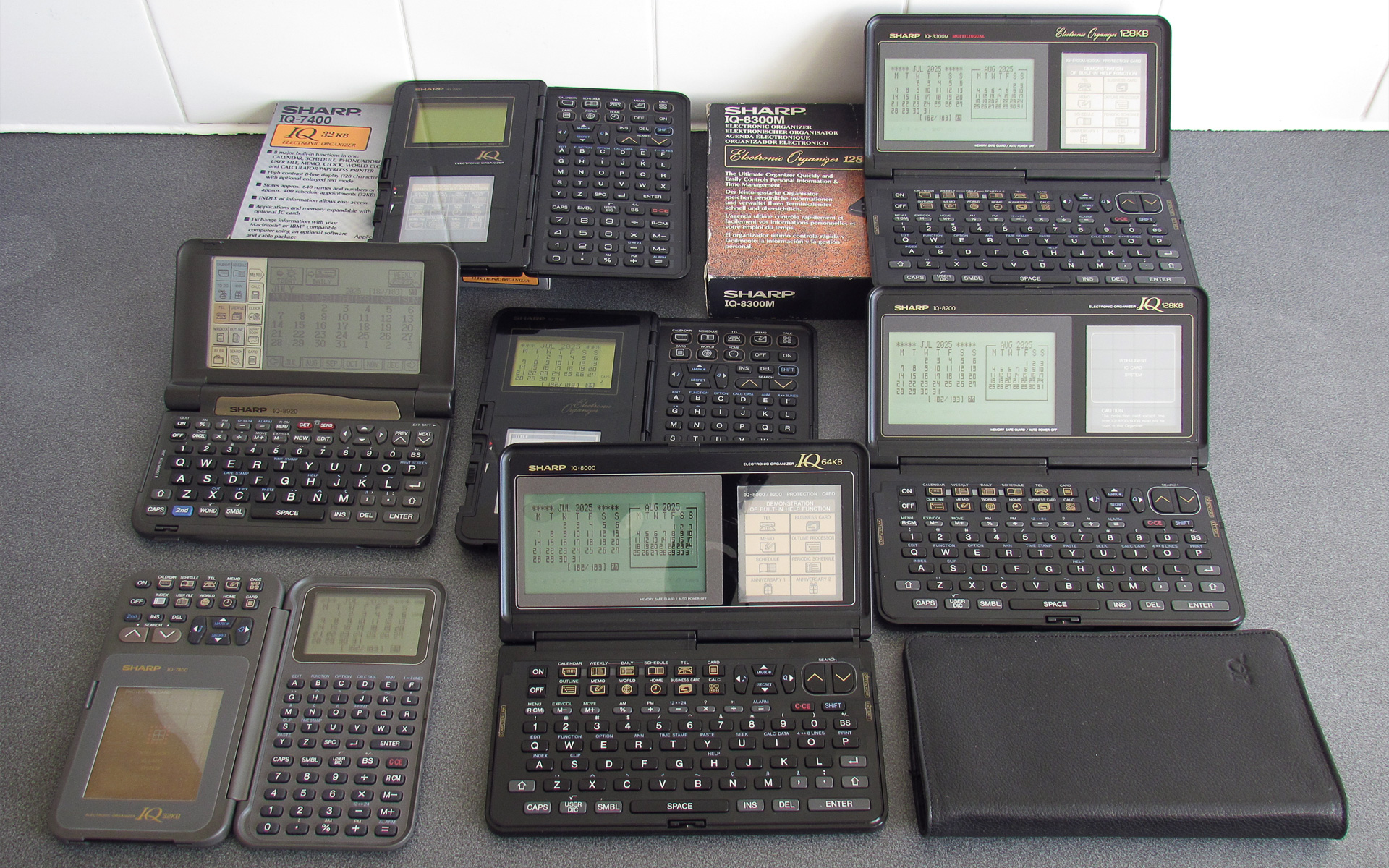
These particular organisers have a card slot on them, which can be used to expand the device's capabilities via a credit card-sized "IC card". The most common sort that you'll find is a RAM expansion card, which allows you to store more data (notes, calendar appointments, address book entries and the like) in a separate area to the device's built-in memory. More interesting, however, are the application IC cards. Dictionaries, thesauri, spreadsheets and even games were made available.
To me the most appealing is the Scientific Computer Card. The organisers do have a simple calculator built in, but the Scientific Computer Card adds more advanced calculator features such as trigonometric functions, logarithms and a statistics package. This is all handled via a very capable BASIC interpreter built into the card, and you can write your own programs on the organiser. The organisers also have a 4-pin "option" port that can be connected to a printer and cassette interface, and a 15-pin "PC link" serial port, so when you slot the card into your organiser you are in effect turning it into a pocket computer (though with all the accessories attached, you might need pretty large pockets!)
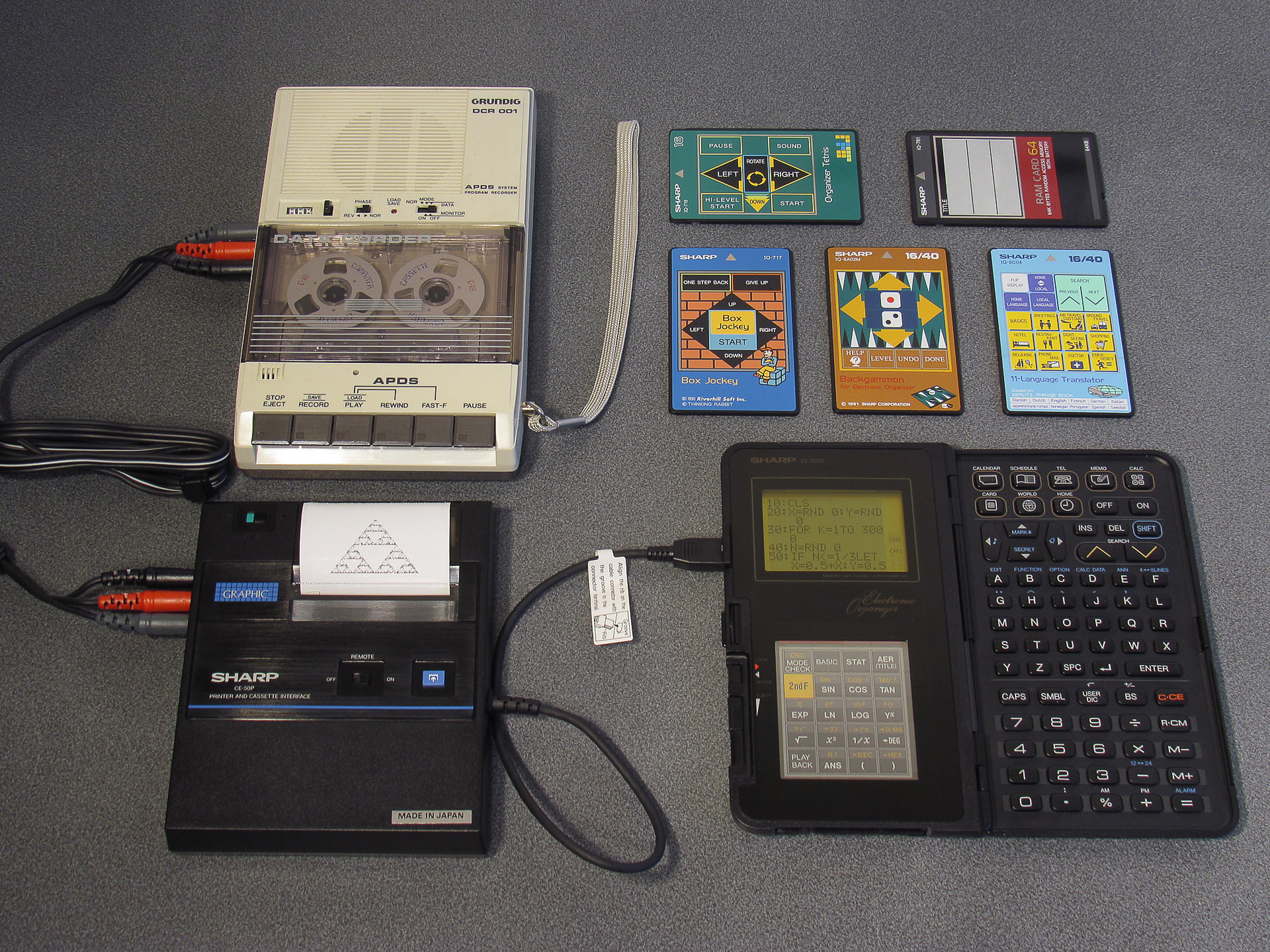
My only real criticism of this arrangement when compared to Sharp's dedicated pocket computers is the IQ-7000's keyboard. It's not too difficult to get used to the non-QWERTY alphabetic characters, but for BASIC programs you often need certain symbols (such as the speech mark, comma, semicolon, colon, less/greater than or ampersand) which are not present on the organiser's keyboard – they're only available via a pop-up menu that appears when you press the SMBL key. This menu only shows 10 options at a time and you need to hunt up and down through it to find the symbol you need; not an ideal experience!
Fortunately, Sharp released later organiser models (such as the IQ-8000) with QWERTY keyboards. Not only are these more comfortable to type on, but most of the symbols are now accessible via a shift key and these organisers retained backwards compatibility with the IC cards from the earlier IQ-7000 organisers.
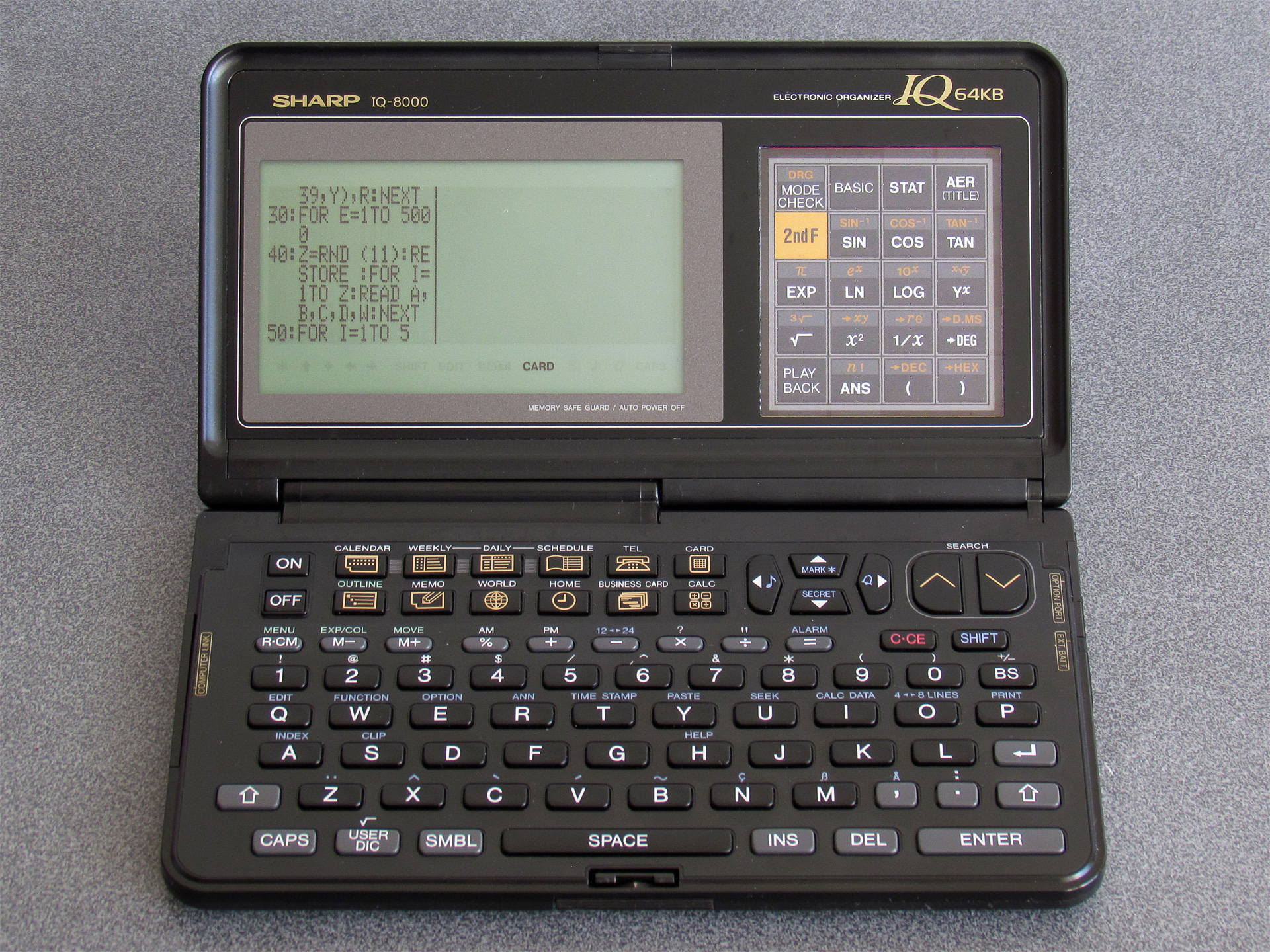
The screen is also quite a bit larger and clearer, albeit now with non-square pixels which can make applications look a little skinny. Unfortunately, old applications developed with the 96×64 pixel display on the IQ-7000 in mind won't know how to take advantage of the 240×64 pixel display of the IQ-8000 and so are rendered on the left hand side of the display with a separator line. That seems like an awful lot of wasted space!
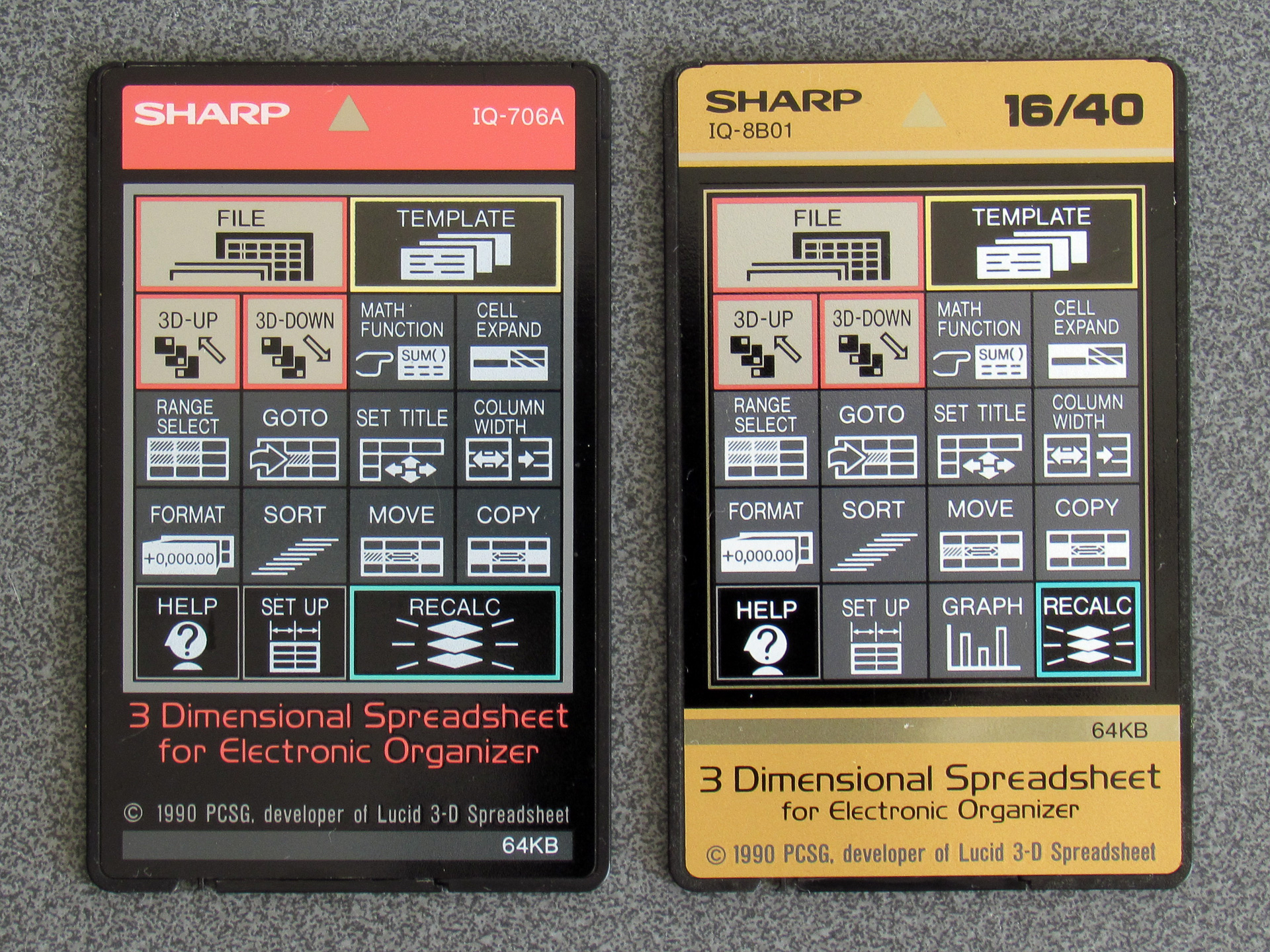
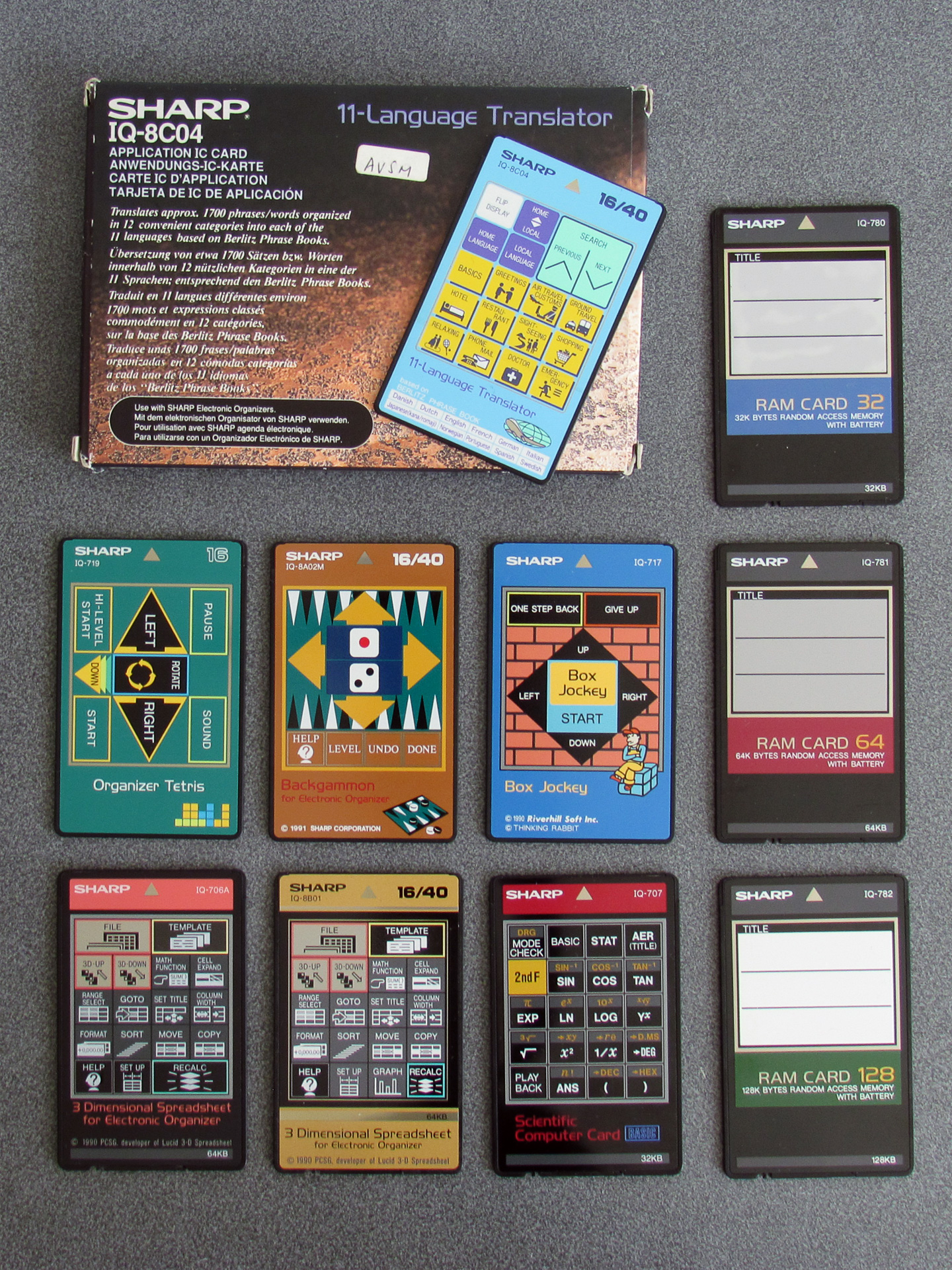
Application cards that took full advantage of the larger screens (up to 40 columns of text) were sometimes sold separately to the versions that were only designed for the smaller-screen devices (16 columns of text). For example, the above photo shows two cards of the same software – 3 Dimensional Spreadsheet for Electronic Organizer – with different card numbers (IQ-706A v IQ-8B01). The card on the right has 16/40 printed in the top right corner, showing it supports both 16-column and 40-column organisers. The card on the left doesn't, and will work in both, but will only display in the leftmost 16 columns.
As an aside, another difference is that the IQ-8B01 version has an extra "Graph" button on it. When the cards are inserted the front labels are visible through a transparent window. That window is touch-sensitive and allows cards to provide custom key shortcuts to certain functions. The graph function will work on a smaller-screen organiser though it is a little cramped; I'm not sure why it wasn't otherwise provided on the IQ-706A.
There was a 40-column version of the Scientific Computer Card available (card number IQ-8B03), however I have yet to find one come up for sale and so I've been making the most of my IQ-707. However, I did find something interesting when I used it on my IQ-8000: certain primitive drawing operations could access the whole screen, even if the rest of the application was constrained to a smaller window.
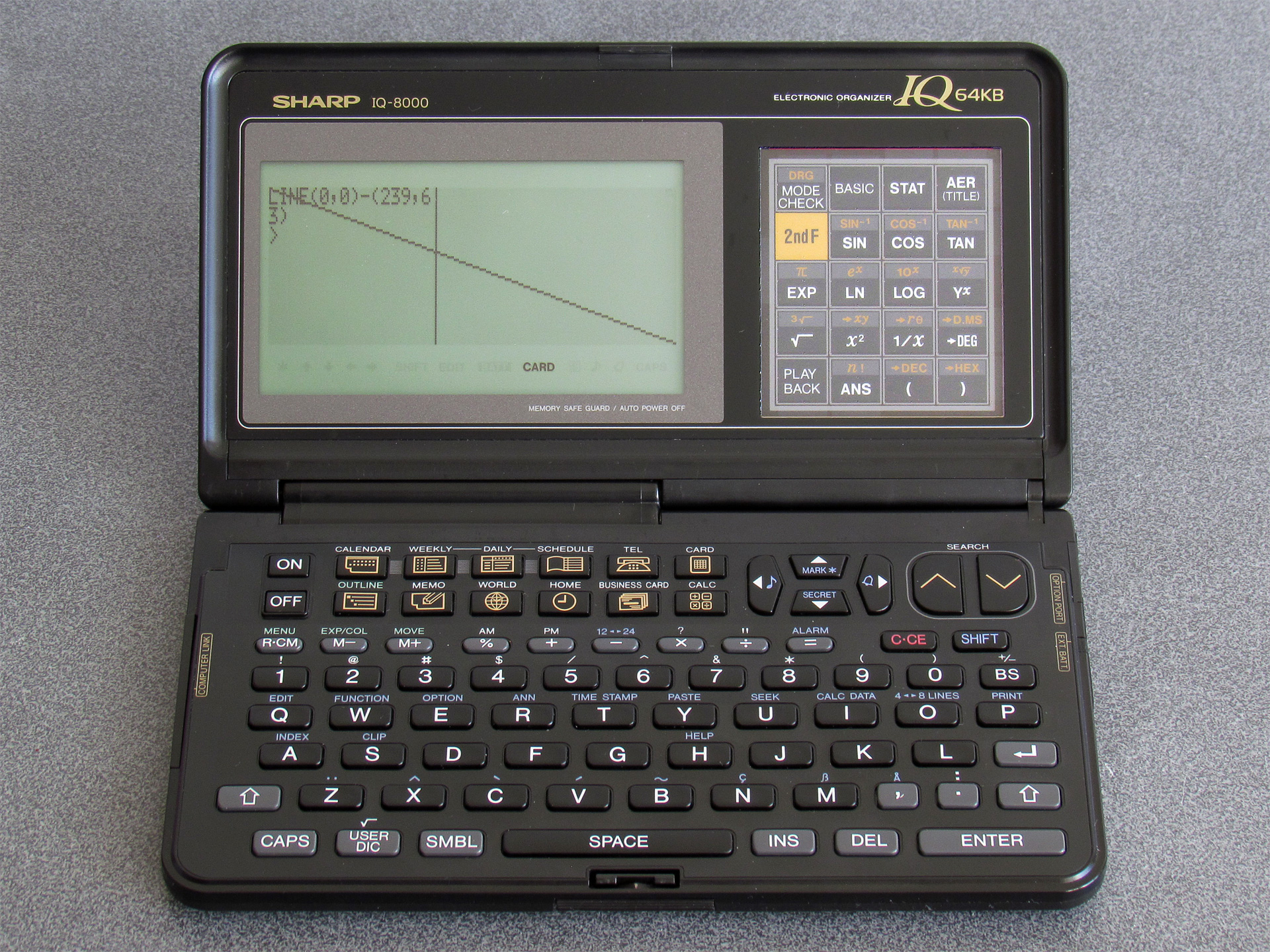
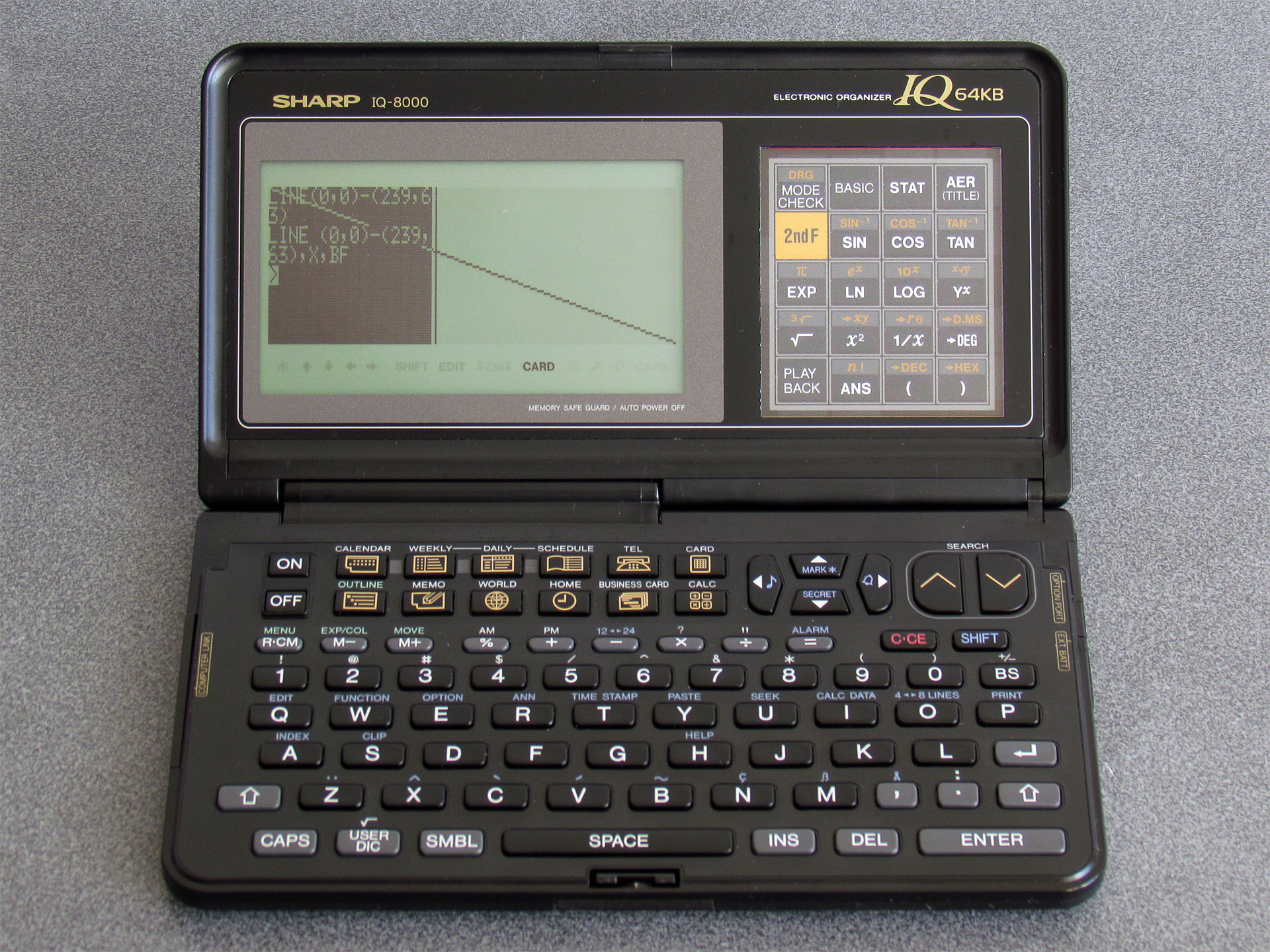
The photo on the left shows the results of drawing a line from (0, 0) to (239, 63) – the line ends up being drawn successfully outside of the 96×64 window at the left of the screen. The second photo uses the same coordinates but also appends the X (invert) and BF (box fill) options which should in theory invert the whole screen, but only ends up inverting the leftmost 96×64 pixels.
Certain other drawing operations (such as PSET and GPRINT) will also happily draw to the whole screen, but text cannot be positioned or drawn outside the 16×8 grid. At this point I wasn't sure if it was the BASIC interpreter or the organiser's OS that was to blame, but I wasn't really sure how to pick apart either of them.
One potential clue came in the form of the WIDTH statement. The IQ-7000 effectively has two screen modes, with differently-sized text characters: the default small font in a 16×8 grid and a larger font that reduces the number of displayed characters to 12×4. These modes can be switched by pressing the button marked 4↔8 Lines, or programatically via WIDTH 16,8 or WIDTH 12,4. The IQ-8000 expands these to 40×8 and 30×4, but trying WIDTH 40,8 or WIDTH 30,4 just displayed an error message. However, something, somewhere must know where the rightmost column number is to allow for proper text wrapping.
I mentioned that the BASIC interpreter is very capable, and it does have an undocumented PEEK function which allows you to read a byte from anywhere in the organiser's memory. I wrote a BASIC program that would scan through memory, switching screen modes with WIDTH and seeing if the value at the address in question changed. Once I'd done this I looked at the addresses that had values that changed in meaningful ways (e.g. between 16 and 12 or 8 and 4).
It looks like the current screen width (in characters) is held in BASIC's memory at &3F988 and the height at &3F989. POKEing a larger width into &3F988 does look like it might start working – if you type then the cursor goes off the right of the 96×64 window and can be seen blinking in the screen beyond, however no characters are printed in this area and certain operations (such as listing programs with long lines) misbehaves in strange ways. There must be more to the puzzle.
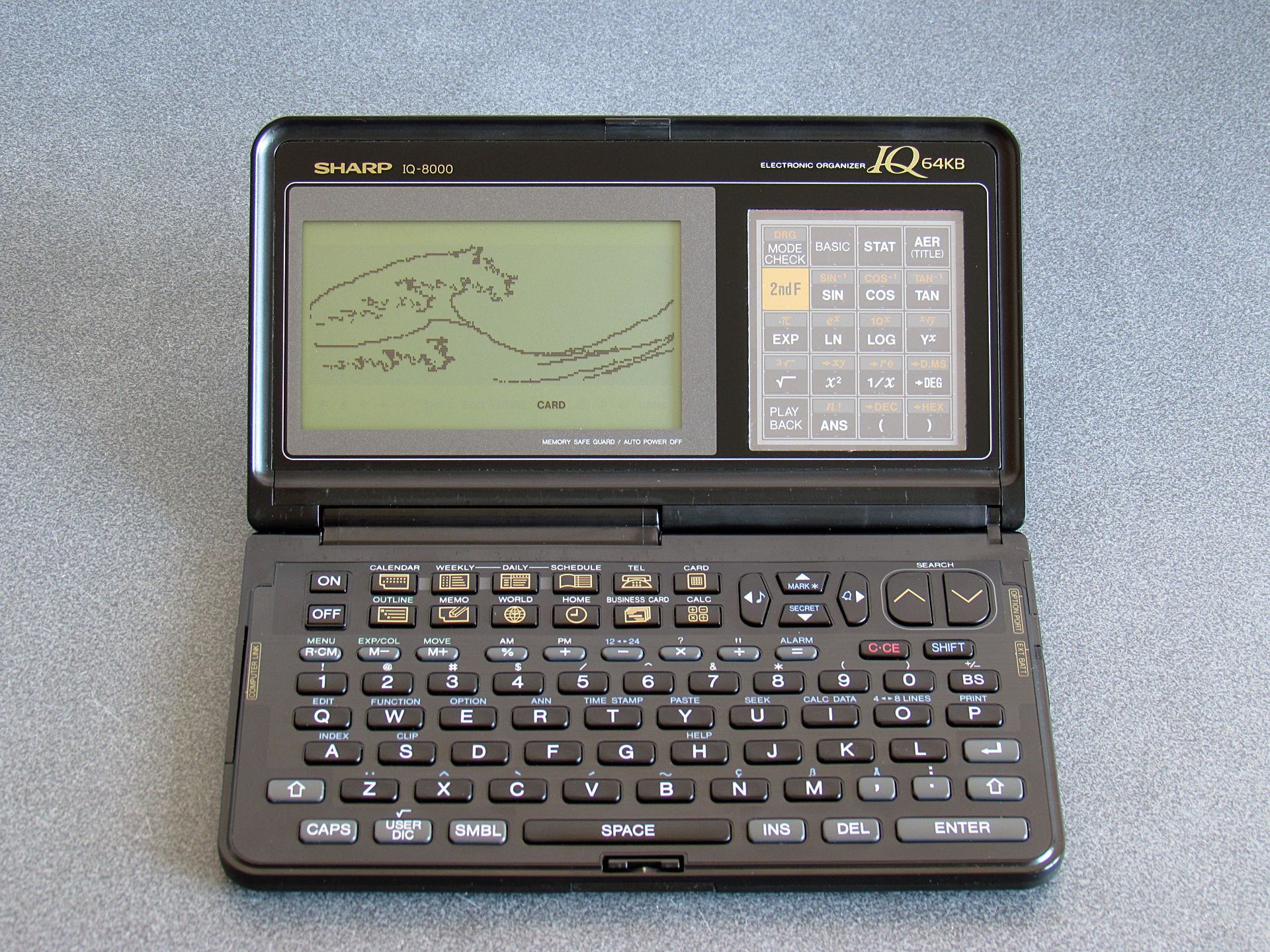
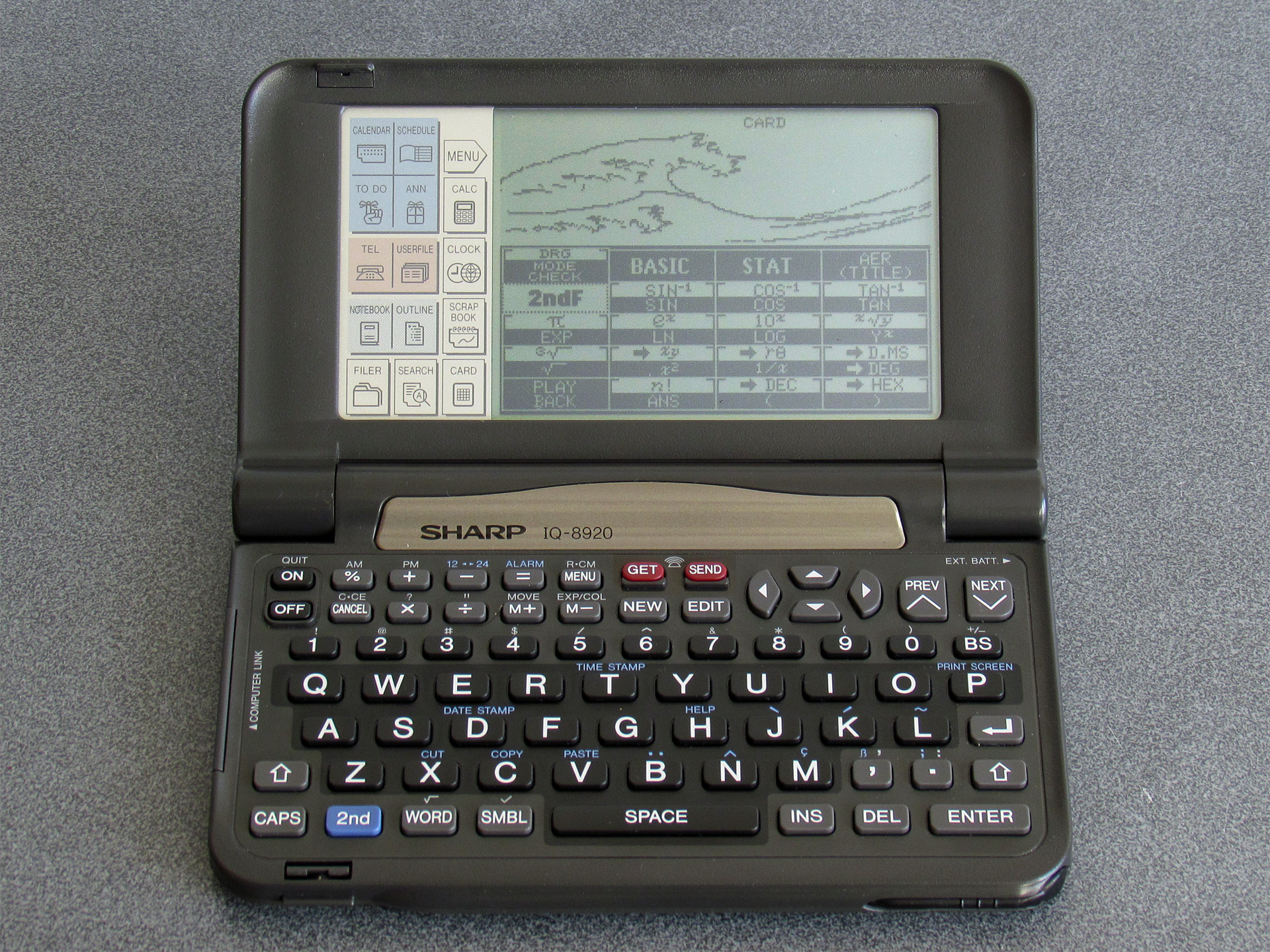
Unfortunately, without knowing more about the internal operation of the operating system or BASIC I wasn't sure where to look. However, having been able to draw lines on the full screen I contented myself with adapting a very clever program by @bazzargh that renders the Great Wave as a fractal for the device (the BASIC listing can be seen here: GREATWAV.BAS).
The next breakthrough was coming across this GitHub repository when looking for other technical reference documents. It has a scan of the "ESR-L Instruction Manual" which documents the Sharp ESR-L microprocessor. Some hand-written notes on the cover of the scan mention that it's "for the PC-E500, OZ-7000 series [and] IQ-7000 series", so should be useful for the IQ-7000 organiser. Looking up the PC-E500 led me to this repository from the same owner which has a PC-E500 reference. Even if the IQ-7000 is not the same as the PC-E500, the use of the same CPU in products from the same company made me think there may be other similarities to help understand how the IQ-7000 works. Using the PC-E500 as a search term also brought me to a page of resources on Andrew Woods' website and from there and digging around in the links (including a few trips to the Internet Archive's Wayback Machine) I was able to source a cross-assembler and disassembler.
I now felt I was in a good position to start pulling apart the BASIC interpreter and OS to figure out if it was possible to use the full screen on my IQ-8000. Of course, I'd need to have a ROM dump to inspect, and fortunately this was quite easy to pull off; after all, I already had a BASIC interpreter running on the device! A simple loop over the desired address ranges, PEEKing each byte then PRINT#ing it to the organiser's serial port with a program on my PC receiving the data and storing it in a file left me with some hefty binaries to dig into.
The size did indeed present a bit of a problem. I did have a disassembler, but not a particularly sophisticated one and feeding it the 128KB of BASIC interpreter ROM didn't provide particularly useful results. I'd normally use Ghidra for a job like this, but it doesn't know about the Sharp ESR-L CPU.
However, Ghidra is user-extensible and I did now have an instruction manual/reference for the CPU, so I did my best to learn how to describe the CPU to Ghidra. This was no small undertaking, as I didn't really know my way around the CPU yet myself. After a bit of work I put together this terrible first attempt. I do not recommend using it yourself, as I haven't fully checked that every instruction disassembles correctly and a very large number of instructions don't describe what they do (or if they do, they might do it incorrectly). The disassembly should be somewhat usable, but the decompilation is mostly useless at the moment.
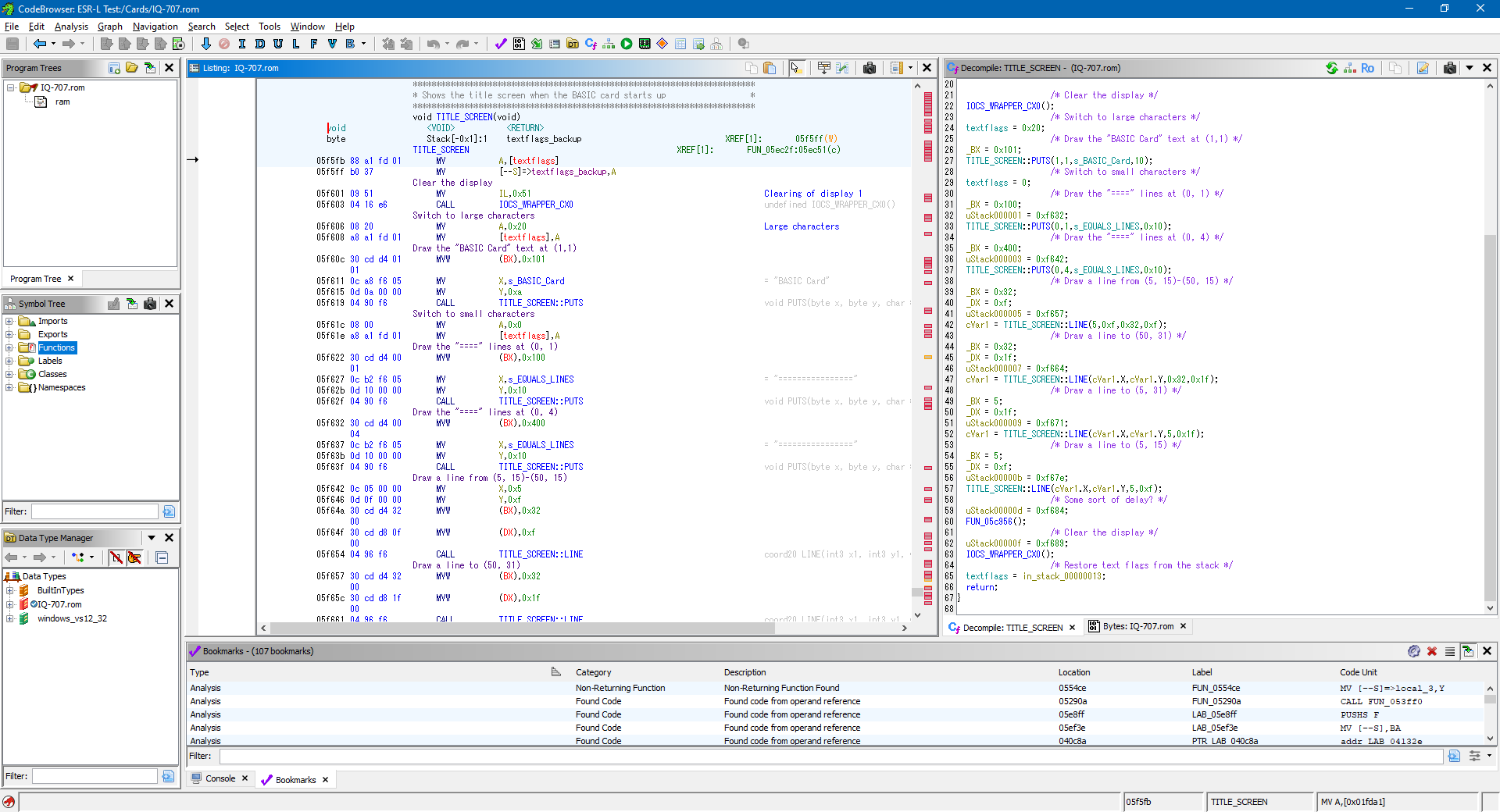
I thought the title screen would be a good starting point to disassemble as I could clearly find where the strings for "BASIC Card" and the equals signs that form the border were in the binary, and from there find out where they were referenced and disassemble the instructions around those references until it made some sort of sense.
This is where the PC-E500 reference ended up being surprisingly useful, as it does share a fair amount in common with the IQ-7000. The way that both operating systems provide access to the hardware is via an IOCS routine at address &FFFE8, and the routine numbers and parameter assignments in the CPU's internal memory appear to be the same on both devices. One difference is certain locations in RAM are different (for example, the location of the text flags or the dot pattern used to draw lines) however these differences are fairly easy to identify.
If you look at the Ghidra screenshot above you'll see that the disassembly on the left looks vaguely sensible but the decompilation on the right is a right mess: for reasons I haven't yet figured out it appears to show stack operations during calls as assignments to variables on the stack (uStack000001 etc) and assignments to variables in RAM which are used as parameters to functions (e.g. BX and DX) are shown as both manual assignments and in the function call parameters.
Trusting the disassembly rather than the decompilation, I dug around in the code, trying to find something that was making use of the magic numbers relating to the screen dimensions: anything with 16, 8, 12 and 4 in close proximity would be a good candidate and I eventually found something promising:
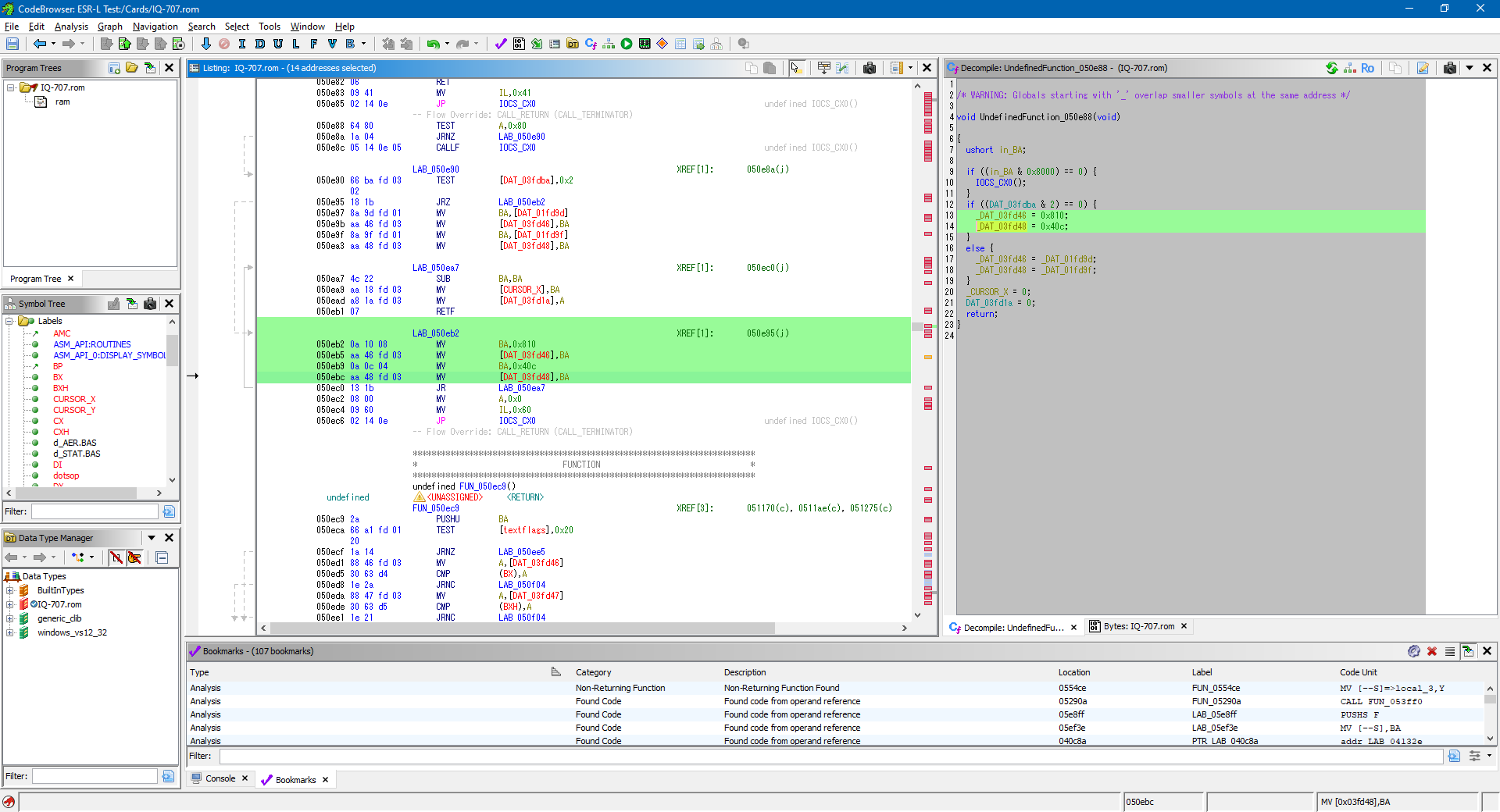
The ESR-L is a little-endian CPU so the hex constants 0x810 and 0x40C in the following code correspond to (16, 8) and (12, 4) in memory.
050eb2 0a 10 08          MV           BA,0x810
050eb5 aa 46 fd 03       MV           [DAT_03fd46],BA
050eb9 0a 0c 04          MV           BA,0x40c
050ebc aa 48 fd 03       MV           [DAT_03fd48],BA
They're stored at &3FD46 and &3FD48 in memory, so directly adjacent to each other, and the surrounding code blocks operate on the cursor's X position and textflags, so it all seems highly relevant to what we're looking for. Those values in memory can be changed with POKE:
POKE &3FD46,40,8,30,4
The side-effect of this change is that you can now use WIDTH 40,8 and WIDTH 30,4 and the mode changes accordingly. However, when you type, text is still invisible once the cursor roams outside the leftmost 96×64 region of the screen. Clearly something else needs to change.
Further up in the code the values at &3FD46 and &3FD48 are copied from other values at &1FD9D and &01FD9F:
050e97 8a 9d fd 01       MV           BA,[DAT_01fd9d]
050e9b aa 46 fd 03       MV           [DAT_03fd46],BA
050e9f 8a 9f fd 01       MV           BA,[DAT_01fd9f]
050ea3 aa 48 fd 03       MV           [DAT_03fd48],BA
These source addresses are in the organiser's own memory rather than the memory built into the BASIC card, so it seems likely that these are the system values for width and height of the screen in the small and large fonts respectively and BASIC maintains its own copies of them which are the values we found before. We could POKE our new text resolutions into those memory locations too, which can be done with this program:
10 POKE &1FD9D,40,8,30,4
20 POKE &3FD46,40,8,30,4
30 WIDTH 40,8
40 CLS
After doing this, the whole screen becomes available to our BASIC program! All graphics operations work on the whole screen and text can be placed and displayed anywhere on it successfully:
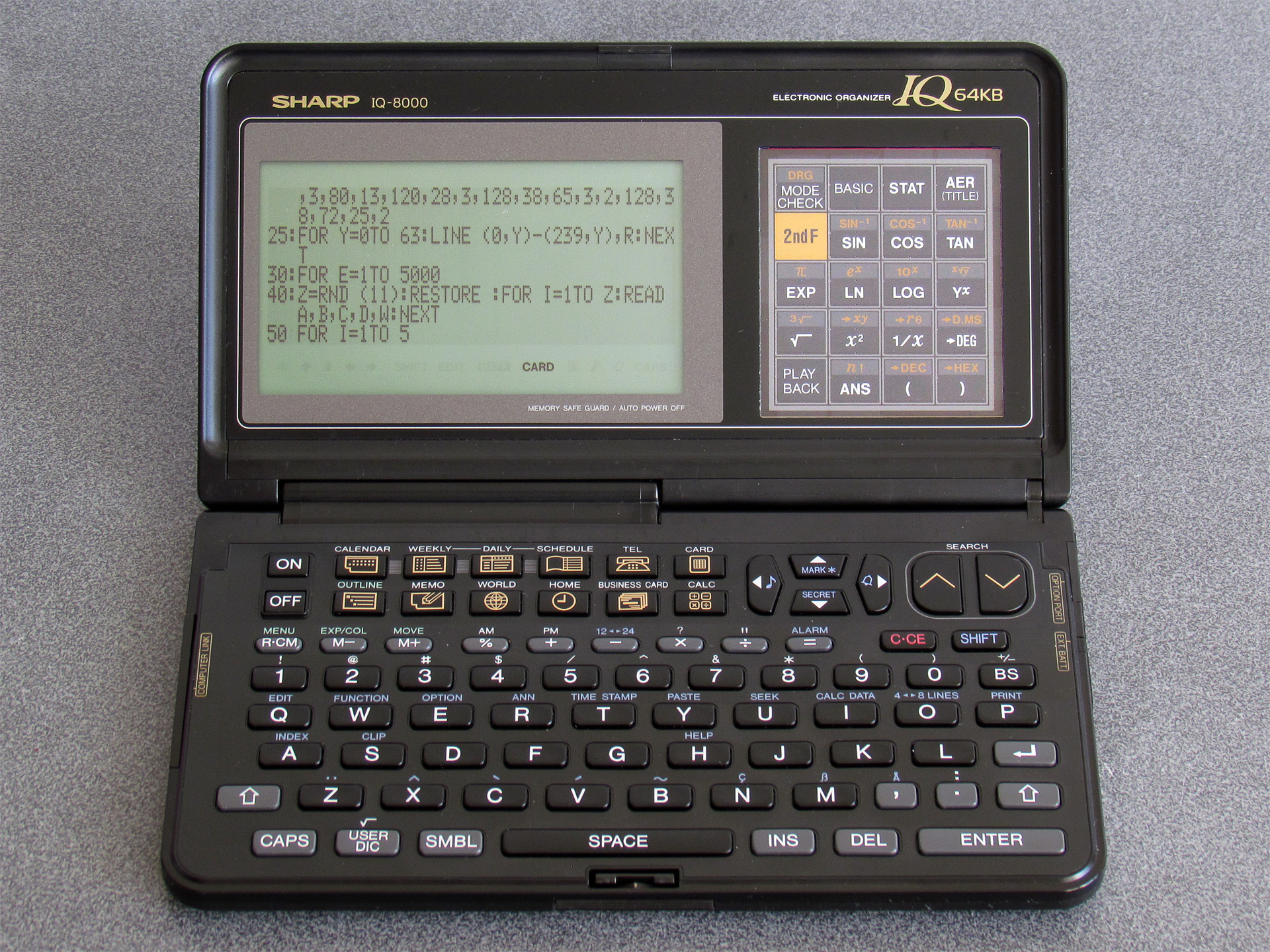
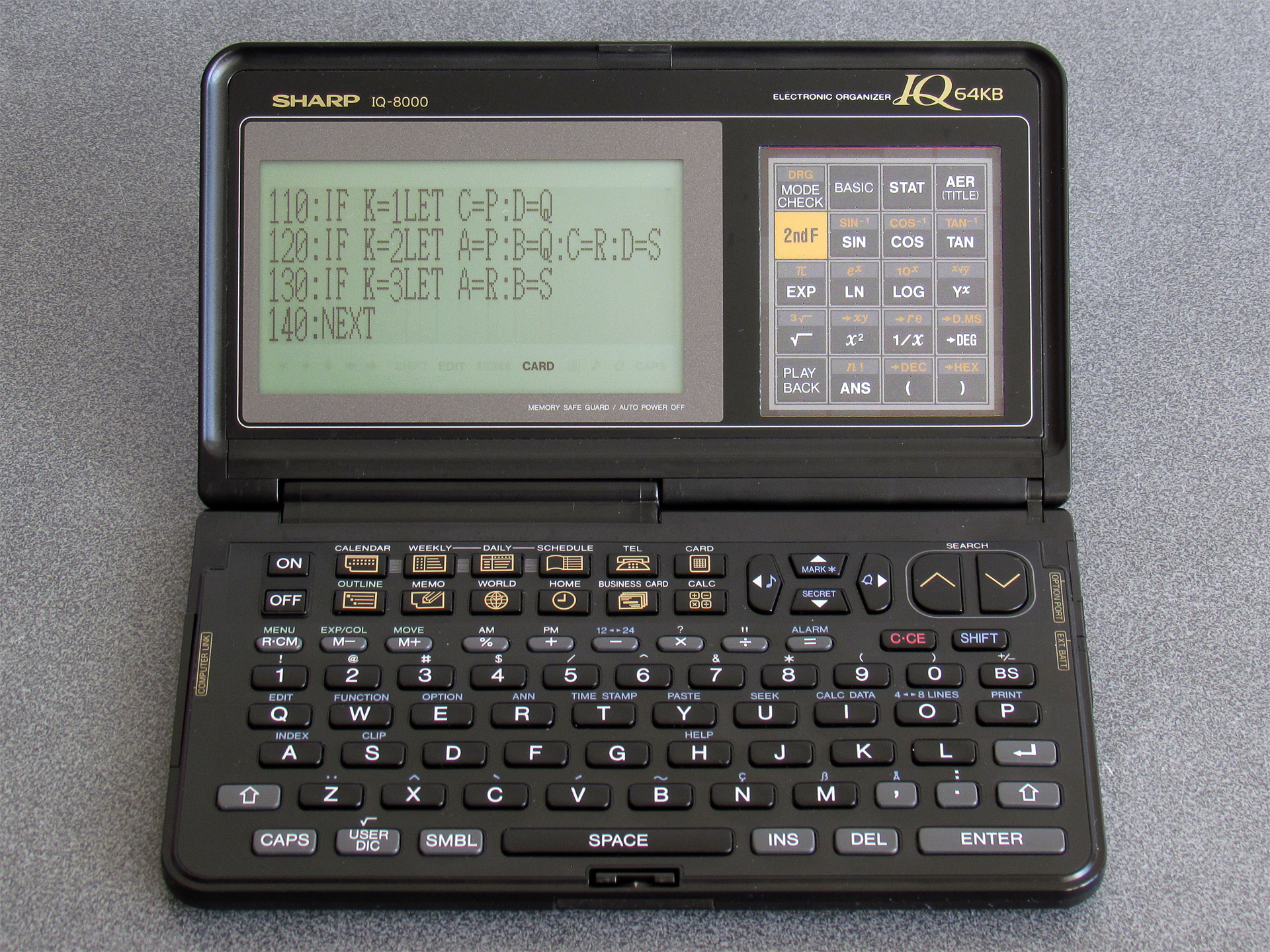
I doubt this is the "correct" way to do it, and there is likely a proper IOCS call that updates the screen resolution. As a result there may be other system variables that are not properly updated by directly POKEing values into memory, but so far I haven't run into any significant problems. As I continue to work through the system ROM disassembly I may find the appropriate routines, however.
I did try to see if the full screen size was stored somewhere in the ROM image, as it would be useful to use this to know how to properly set the display mode according to the current organiser's capabilities. I did find the byte sequence (16, 8, 12, 4) in the IQ-7000 (&F083C) and IQ-7400 (&F478A) ROM dumps and the byte sequence (40, 8, 30, 4) in the IQ-8000 (&F1412), IQ-8200 (&F1418) and IQ-8300M (&F1423) ROM dumps. I couldn't find any code that was able to meaningfully access these sequences from a user application. There may be some way to properly identify the device you're running on but I'm not currently sure of a reliable way. One potential option is to use POINT(96,0) – this returns the status of a pixel on the display (0 for off, 1 for on), and crucially it returns -1 if the value is outside the screen bounds. On an IQ-7000 it returns -1, but on an IQ-8000 it returns 0 or 1. However, a later organiser model throws a spanner in the works…
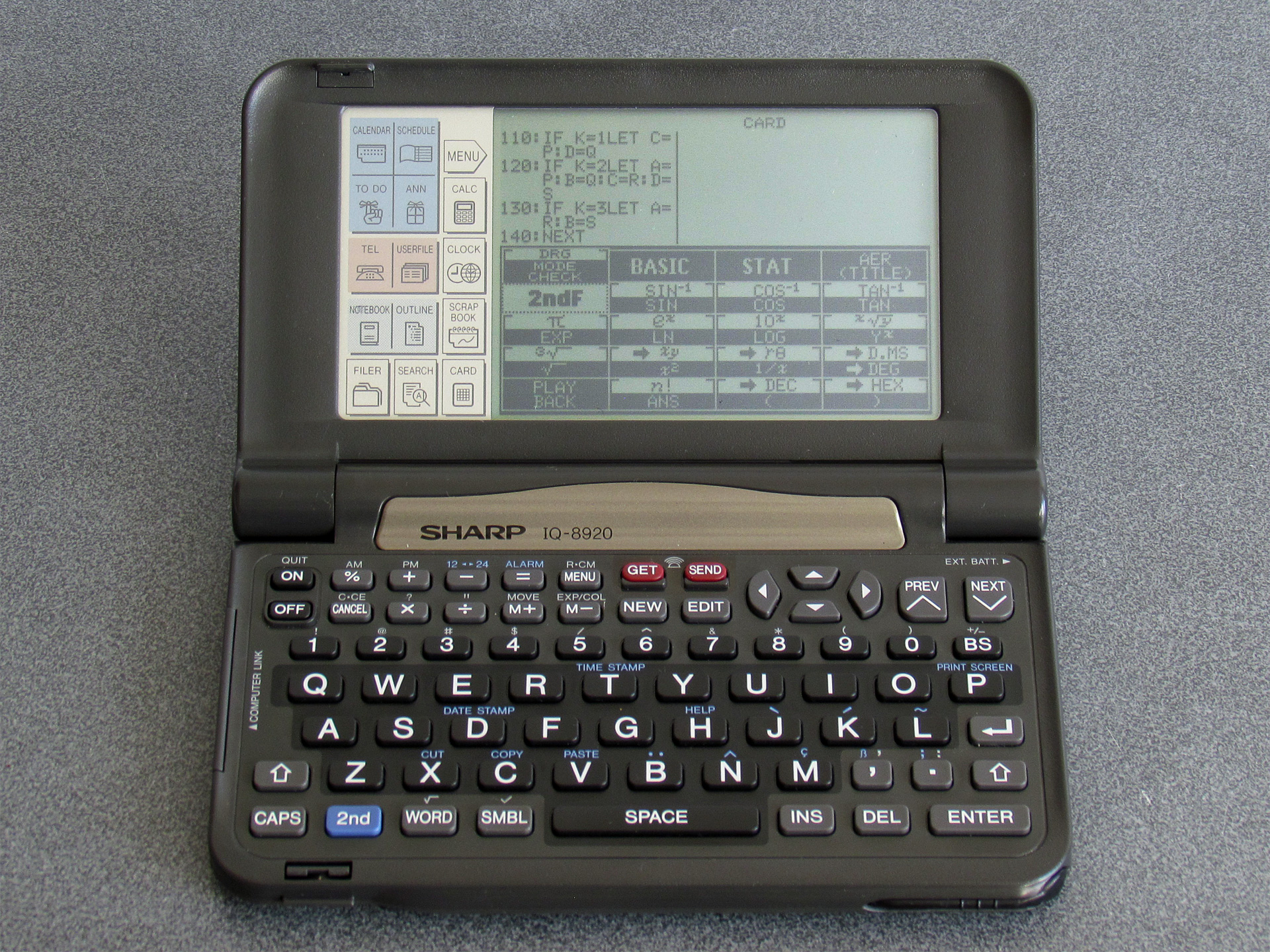
This is the Sharp IQ-8920. Its screen is still 240 pixels wide, like the IQ-8000, but it is significantly taller and has square pixels. When I first saw one of these online I was less interested in it as it didn't have the obvious card slot, but when I looked at a closer photo of it I could see that it still had one on the side. I couldn't see how this would work, as it's missing the window to see the card's buttons through, but I ended up picking one up anyway. It turns out it is still backwards-compatible with the cards from the earlier organisers, and this backwards-compatibility is achieved by displaying the card's buttons directly on the resistive touchscreen (I assume there's a database of cards and their button assignments somewhere in the IQ-8920's ROM). The IQ-8920 also corrects one notable oversight of the IQ-8000…
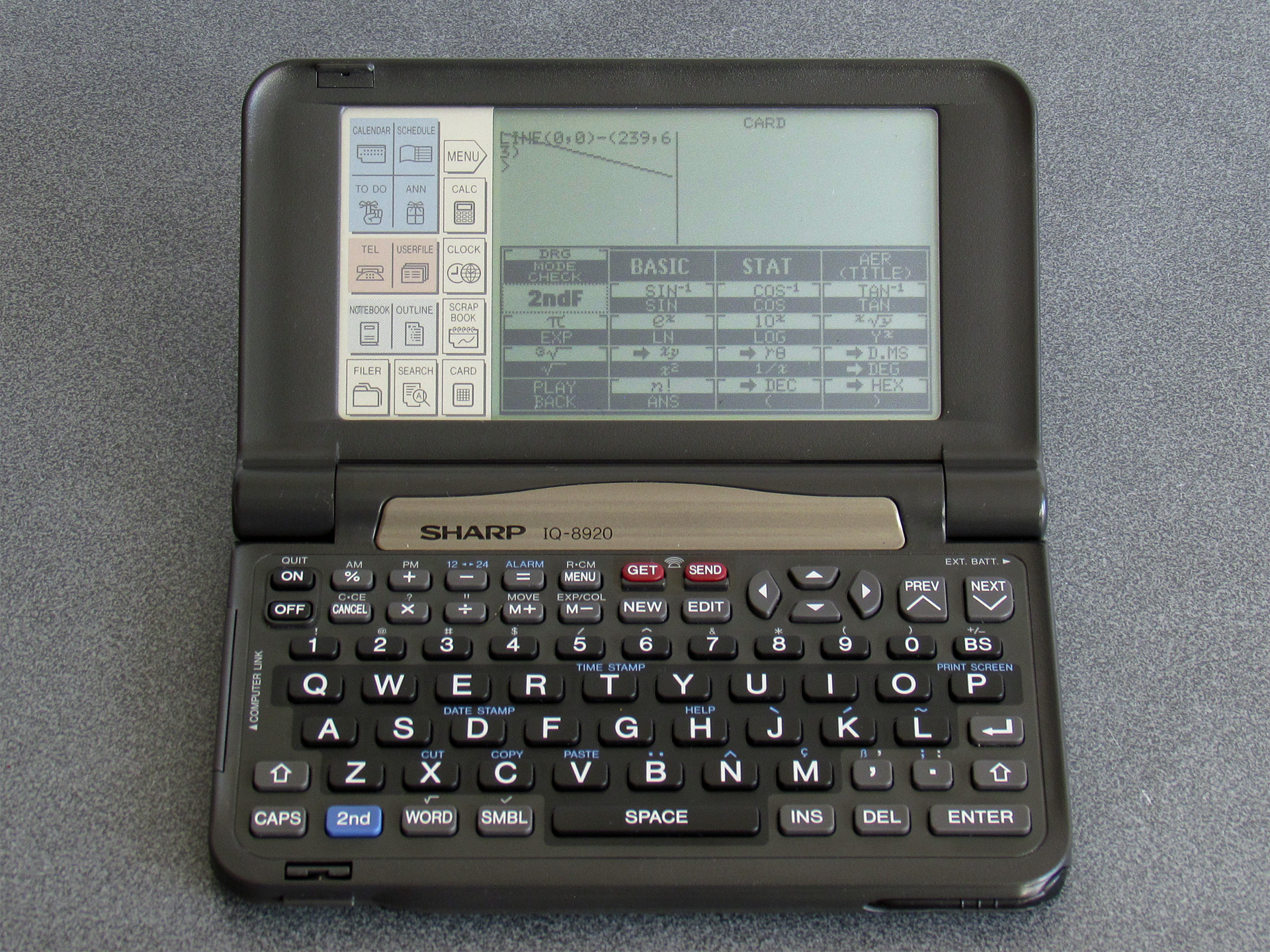
Attempting to draw graphics out-of-bounds on the IQ-8920 results in them being properly clipped, unlike the IQ-8000 which permits some graphics operations to work even when only the leftmost 96×64 region of the screen should be accessible. This means that on the IQ-8920, POINT(96,0) returns -1 by default and so this can't be used to detect a device with a screen that is wider than 96 pixels.
However, the same BASIC POKE program can be used to get the IQ-8920 to use the full width of the display:
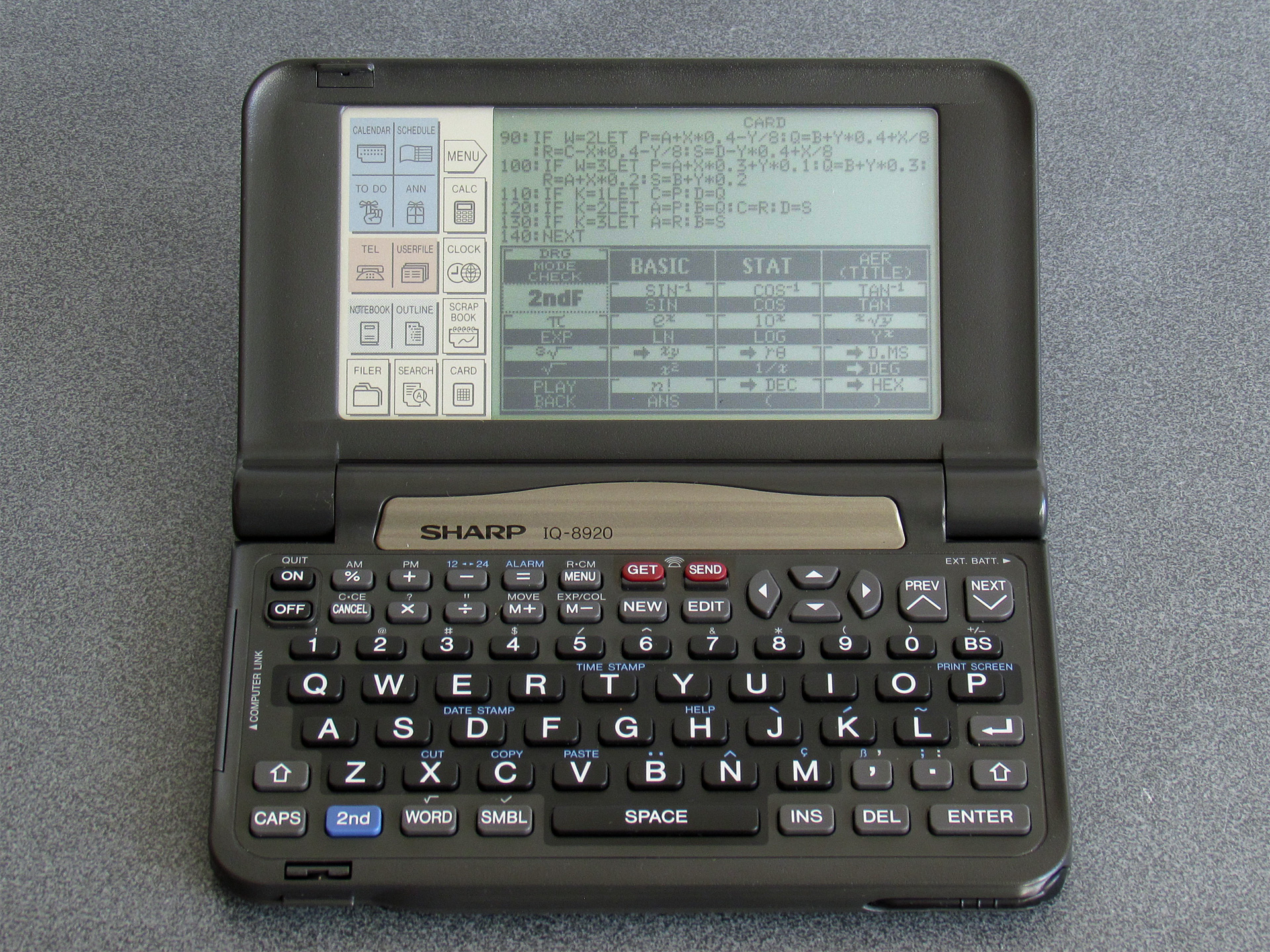
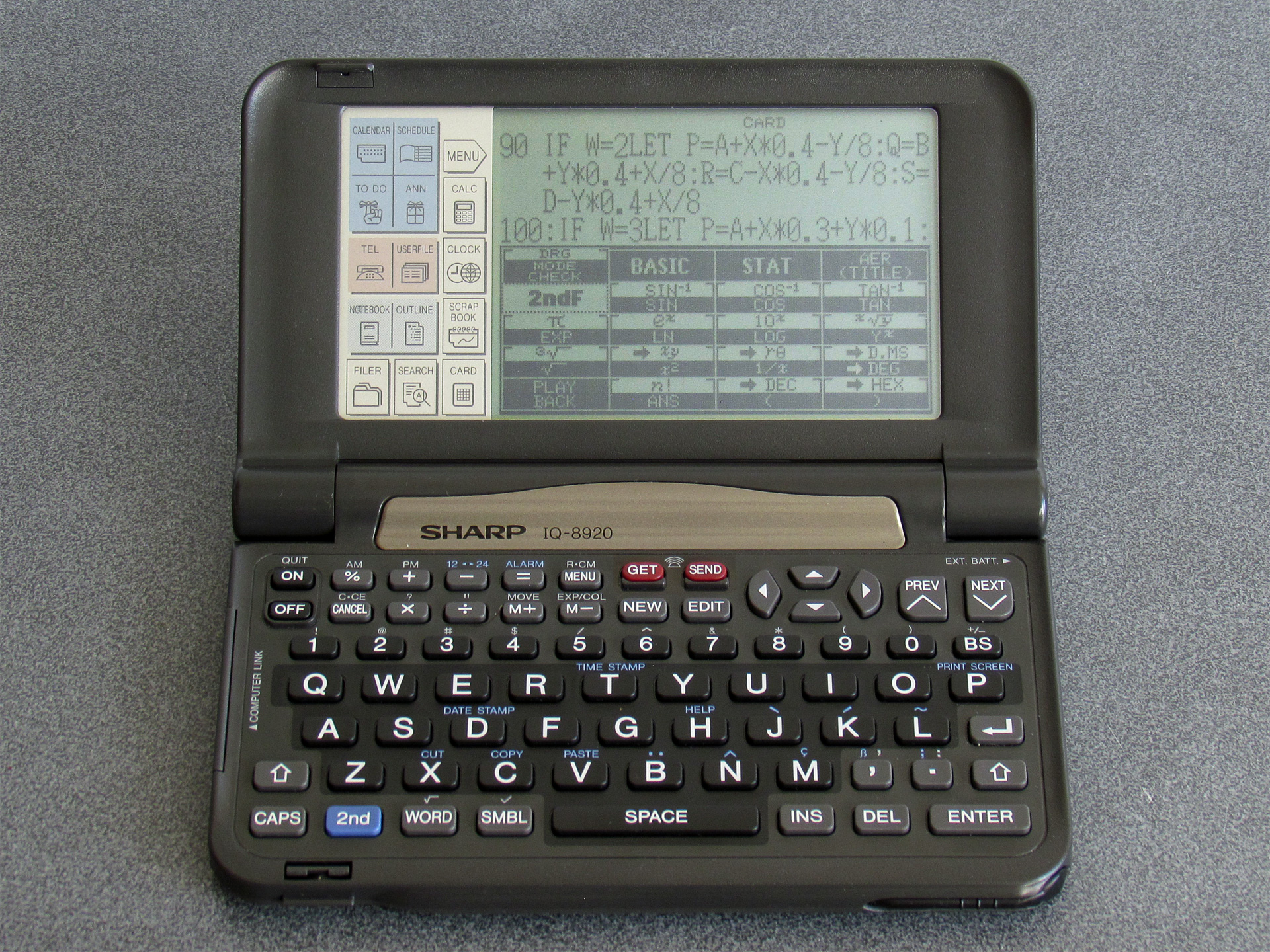
I did also try extending the height of the screen, and though this looks a little promising at the start (as you work down the screen, new lines of text start overwriting the on-screen button display) things go very wrong when the screen tries to scroll and the organiser hangs quite often. Some other scrolling operations do misbehave (e.g. when scrolling through a program listing, occasionally a single line of text may appear invisible) and I'm not entirely sure what the cause is yet. The Great Wave does at least now appear on the IQ-8920:
One thing which susprisingly does not misbehave is if you extend the screen resolution on an original IQ-7000 or IQ-7400. Text disappears off the right of the display, but I haven't seen it crash or hang the organiser. POINT(96,0) still returns -1 with the screen extended on this organiser, so one solution may be to just to try to set the screen to the higher resolution, check if POINT(96,0) is out of bounds, and if it is reset back to the lower resolution. The program would then look like this:
10 POKE &1FD9D,40,8,30,4
20 POKE &3FD46,40,8,30,4
30 WIDTH 40,8
40 CLS
50 IF POINT(96,0)=0THEN END
60 POKE &1FD9D,16,8,12,4
70 POKE &3FD46,16,8,12,4
80 WIDTH 16,8
90 CLS
I will continue to dive into the OS ROM disassemblies to see if I can find ways to make this more reliable and whether there's a more correct way to do this. It would be useful to be able to dump the ROMs for the other 16/40 cards I have to see how they manage the mode switch, however as I've been dumping the ROMs from a BASIC program and I don't have an organiser with two card slots I don't currently have a way to do that. The card lock switch (which causes the organiser to switch off and reset when changing cards) appears to be handled in software (rather than being a hardware interlock) so it may be possible to write a ROM dumping program in assembly, copy it to somewhere safe in RAM from a BASIC program and then hot-swap the cards. There's 2KB of clipboard buffer that looks usable for this process, and you can CALL machine code you've POKEd into memory – I have no idea whether that will be technically possible, though, so this is just something at a very early idea stage.
I did discover a test menu in the IQ-7000 and IQ-7400 ROMs, though. Bear in mind that accessing these will reset your organiser's settings and may clear the RAM, so don't do it on an organiser that contains data you care about!
The one in the IQ-7000 isn't particularly enlightening, but can be accessed by holding ON+9 when pressing the reset button. The one on the IQ-7400 is more interesting and can be accessed by holding ON+CALC when resetting. Of particular note here is a memory dump, which allows you to enter an address and shows the data at that address on the screen. This would allow you to dump an IC card, but it only shows 16 bytes at a time and so could be very time consuming to work through! There is also a memory save and load routine in the test menu that looks like it will transmit the data from the organiser, but unfortunately it doesn't appear to let you enter the start address or length and just exports the built-in RAM rather than letting you enter the address of a card in the slot. The IQ-7400 also has a ROM version screen that can be shown by holding ON+A when resetting.
I don't know if this will have persuaded anyone that Sharp's electronics organisers are more interesting than they might first appear, but if you can pick one up along with a Scientific Computer Card I think you'll find they're fun little devices to experiment with!
Highlighting and tape loading PC-1500 BASIC programs on the web
Friday, 9th May 2025
I don't think I've had a proper dose of "man-flu" since COVID and I haven't missed it at all. This journal entry has been written in a state of sleep deprivation whilst being tanked up on Lucozade and Lemsip (expiry date: March 2020) so hopefully it still makes some degree of sense.
In my current state the most obvious project is to subject myself to the banshee howls of tape loading. I've implemented some degree of tape loading support to my site before by taking tokenised BBC BASIC programs and running them through a web service that converts them to UEF files that can be played back in the browser with PlayUEF, and with my recent interest in the Sharp PC-1500 it would seem like a sensible idea to do something similar for that computer.
Unfortunately, whilst PlayUEF is a superb piece of software for loading Acorn software, it is less ideal for the Sharp PC-1500. This isn't a limitation of the UEF format itself, it's just that Sharp PC-1500 programs are stored at a different base frequency (1270Hz instead of 1200Hz), use a 0° phase instead of 180° phase, and repeat the wave patterns for 0 bits and 1 bits four times longer than the BBC Micro format ("300 baud" mode instead of "1200 baud" mode). None of those features were supported by PlayUEF, however it is open source software so I hacked them into my own fork of the project.
Note that I do say "hacked", as PlayUEF does take some shortcuts when generating the resulting waveform that I found a bit awkward to work around. For example, it needs to allocate a buffer to write the wave file to and so needs to know the number of samples in the resulting wave file to do so. It normally does this by multiplying the number of wave cycles in the file by the number of samples per cycle, but that only works if the number of samples per cycle remains constant through the file (which they won't if we're changing the frequency on the fly) and the number of cycles per bit also needs to remain consistent (which it won't if we're outputting four times as many wave cycles for the Sharp PC-1500 when compared to BBC Micro).
In the end I worked around this with a two-pass solution: the first time around a zero-byte buffer is allocated and written to (which appears to work?) and the final length is calculated by adding up the total number of samples. The second time around the buffer is allocated the total number of samples it requires.
Whilst this works and the end result loads fine onto an actual Sharp PC-1500, the code is now a bit of a mess and there are a lot of nifty visualisations and "fast loading" tricks that only make sense to the BBC Micro but are still baked into PlayUEF. For my own use I might make a less sexy alternative to PlayUEF that just converts a UEF to a wave for loading via the web. However, for now it works as-is.
To support all this I also needed way to tokenise (and detokenise) Sharp PC-1500 BASIC programs and convert the resulting binary into a UEF tape image. To do this I've knocked together a couple of PHP classes, sharp_pc1500_basic and sharp_pc1500_tape that do the work and these files can be downloaded in sharp-pc-1500-php.zip.
Here are some examples of how this works (click the "Load file as tape image" to hear the beautiful sounds):
Relocatable Quick-Tape installer for the Sharp PC-1500
Saturday, 26th April 2025
After my previous journal post about faster saving and loading of Sharp PC-1500 programs to and from tape I discovered that I was using a somewhat out-of-date version of Sharp Pocket Tools. The later version I upgraded to adds support for the "SuperTape" and "Quick-Tape" formats, and also includes copies of the PC-1500 programs for those formats.
Both formats appear to support file names and verification of the recorded data (a minor gripe I had with the Fast Load was its lack of these features). SuperTape apparently manages even higher speeds, though at the cost of somewhat more RAM than Fast Load (711 bytes, or 761 for the full version with the ability to merge a program with the existing one in memory, instead of Fast Load's 540 bytes). Quick-Tape seems to be about the same speed as Fast Load, but actually consumes less memory overall (only 508 bytes). Quick-Tape also explicitly supports saving machine language programs by specifying a start and end address, something that I cannot see is supported with the SuperTape format, though it looks like it might support loading machine language programs if the correct load address is stored in the file.
Based on my experiences with Fast Load and the documentation that accompanies SuperTape and Quick-Tape I came up with a rough feature comparison table (I can't claim it's completely accurate, as it's based on what I've gleaned from the documentation):
| Format | Fast Load | SuperTape | Quick-Tape |
|---|---|---|---|
| Speed | Fast | Fastest | Fast |
| Filenames | ✗ | ✓ | ✓ |
| Verification | ✗ | ✓ | ✓ |
| Machine language | ✗ | (Maybe?) | ✓ |
| Variables | ✓ | ✗ | ✗ |
| RAM usage (bytes) | 540 | 711–761 | 508 |
| Relocatable | ✓ | (Partial) | ✗ |
To get a rough idea of speed I tried converting the Globe application to a wave file. Both Fast Load and Quick-Tape produce a file that's 30 seconds long — a huge improvement over the seven minutes that the native cassette routines take. SuperTape still manages to blow both of these out of the water with a file that's only 13 seconds long! Only Fast Load seems to have the ability to save BASIC's variables to tape, though this is not a feature I personally have any use for.
The ability to relocate the machine language routines that make up the tape routines is a very important one, however! The available range of memory addresses in a PC-1500 computer will depend on which memory expansion module is installed and whether any other machine language routines are also loaded. Fast Load can be relocated to anywhere you want in memory via its BASIC installer program. SuperTape has a few different versions for different starting addresses based on certain memory modules as well as a BASIC installer, however as far as I can see it doesn't seem to allow being loaded at an arbitrary address which would make it trickier for it to coexist alongside other machine language programs on the computer. Quick-Tape doesn't have any relocation support at all, only working if loaded to address &00C5 and used with the CE-161 memory expansion module.
However, Quick-Tape seems like it would otherwise be ideal — it consumes the last RAM, it seems the most feature-complete and though it's not quite as fast as SuperTape it's still a massive improvement over the native cassette routines.
I therefore decided I'd try to make a relocatable version of Quick-Tape. To assist with this I first disassembled it using lhTools. It doesn't load any data nor jump to any absolute addresses within its own memory space, which is a good start — in fact, it only calls three subroutines inside itself: &01BE, &01BF and &01CF. You can spot these easily in the disassembled code as they are assigned named labels by lhTools instead of absolute addresses, for example in this snippet:
lbl_0_159:
	SJP	lbl_0_1be ; labelled address inside our memory
	ADR	Y
	LOP	lbl_0_159
	LDA	YH
	SJP	lbl_0_1bf ; labelled address inside our memory
	LDA	YL
	SJP	lbl_0_1bf ; labelled address inside our memory
...as opposed to:
lbl_0_117:
	SJP	BBD6 ; absolute address outside our memory
	VMJ	0A
	SJP	BBC0 ; another absolute address outside our memory
The version of lhTools I'm using is one I've modified to use the standard LH5801 instruction mnemonics instead of the Z80-inspired ones it normally uses; it also disassembles vectored subroutine calls into standard VMJ instructions instead of the lhTools pseudo-instructions, though as I haven't got it to re-assembled these instructions properly yet this is not something I'm able to share just yet. However, the important thing here is the subroutine called with the SJP instruction.
Now that we know where these subroutine calls are, a BASIC program can be written that patches the loaded machine language program with the correct target addresses for where it's been relocated to. Similarly, the reserve program (which contains BASIC CALL statements to call the entry points in the machine language program) needs to have its addresses patched to point at the relocated machine language program. The resulting installer looks like this:
    10 M=PEEK &7863*256+197:B=PEEK &7865*256+PEEK &7866
    20 IF B-M<508 PRINT "No room": END
    30 L=M: IF B-M>508 WAIT 0: PRINT "Load @";L;" ";: INPUT L
    40 CLS : WAIT : IF (L<M) OR (L+508>B) PRINT "Bad address": GOTO 10
    50 WAIT 0: PRINT "Play QUICK-TAPE...": CLOAD M"QUICK-TAPE";L
    60 FOR I=1 TO 3: READ A,C: FOR J=1 TO C
    70 READ O: POKE O+L,(A+L)/256,(A+L) AND 255
    80 NEXT J: NEXT I
    90 DATA 249,1,149,250,2,157,161,266,3,411,443,452
   100 M=M-197: PRINT "Play QUICK-RESERVE...": CLOAD M"QUICK-RESERVE";M
   110 FOR I=1 TO 6: READ A,O:A$=RIGHT$("00"+STR$ (A+L),5)
   120 FOR J=1 TO 5: POKE M+O+J,ASC MID$(A$,J,1): NEXT J: NEXT I
   130 DATA 4,89,6,101,5,113,2,130,1,153,0,165
   140 CLEAR :Z$="": WAIT : PRINT "QUICK-TAPE installed"
You can download the installer and reserve program as ready-to-go WAV files in Quick-Tape-Install.zip. You'll also need to create a WAV file for Quick-Tape itself, which can be downloaded as part of Pocket Tools. Instructions can be found inside the installer zip archive.
Faster tape loading on the Sharp PC-1500 with Fast Load
Sunday, 20th April 2025
After I've typed a program into my Sharp PC-1500, I tend to save it to my PC for long-term storage using the CE-150 cassette interface. I use the same cassette interface to download programs shared by others over the Internet, and have written a previous post about resampling those shared wave files if you're struggling to load them.
Loading a program this way is quicker than typing them in, but not by much! The Globe application is 5697 bytes in length but takes the best part of seven minutes to load from tape. I was therefore very intrigued by the Fast Load application, which "enables fast loading (4000 baud, 13 times the normal speed) of all Basic or machine language programs and variables".
I didn't have the easiest time using this program, so thought I'd put together this post in case it helps anyone else with similar struggles!
Fast Load's component parts
The included documentation is a little confusing. I assume it's been abbreviated from what would have been included with the original tape, but I'm really not sure. It mentions using CLOAD M to load FAST-LOAD, however if this is to be a relocatable module then how should it be relocated once loaded, and after that point how are you to invoke the saving and loading routines?
Included in the zip archive there are actually three different recordings for three different files, and after studying them a little they need to be loaded in the following order:
- FAST-RELO: This is a BASIC program that loads the other two files and performs the relocation.
- FAST-RESERVE: This is a reserve program that provides the key mappings to call the save/load routines.
- FAST-LOAD: This is the machine language program that implements the save/load routines.
Understanding how all three parts operate will require a bit of knowledge of the PC-1500 and how memory is arranged.
PC-1500 memory layout for reserve program, machine language program and BASIC program
A reserve program occupies the first 197 bytes of RAM. This program can redefine the six keys positioned directly under the display to type in a sequence of characters when pressed. Three separate groups of key mappings are provided (the current group is indicated by the presence of an I, II or III icon on the display) which can be cycled through by pressing the select key. A string can also be stored for each group to act as a reminder of which key does what, and this can be displayed by pressing the RCL key. In the case of Fast Load, the reserve program sets up four keys (two in reserve group II, two in reserve group III) to execute the program/variable save/load routines which it does by typing in CALL <address> and pressing the Enter key. The appropriate routine address for each key is patched into the reserve program by the FAST-RELO BASIC program.
The routines themselves need to be loaded somewhere into memory. By default, the current BASIC program starts in memory immediately after the reserve program's fixed 197 bytes at the bottom of memory, however it is possible to move the start of the BASIC program by passing a numeric parameter to NEW. The numeric parameter defines the start of the BASIC program in memory, but it will not allow you to move it below the end of the reserve program and so a good way to reset the BASIC memory to its largest default is with NEW 0 – a command that you are prompted to enter whenever the device has been reset or a memory expansion module has been changed.
By moving the start of the BASIC program to a higher address in memory it leaves a gap between the end of the reserve program area and the BASIC program that is free for us to load persistent machine language programs.
Note that memory does not necessarily start at address 0, either! In its base configuration RAM starts at &4000, with a CE-155 (8KB) RAM expansion module RAM starts at &3800 and with a CE-161 (16KB) RAM expansion module RAM starts at &0000. Fortunately you can read the most significant byte of the RAM start address from address &7863, which makes it a bit easier to calculate sensible values to load to.
Loading Fast Load into memory using its loader
For simplicity, if we assume we're only going to load Fast Load (and don't need to worry about reserving any additional RAM) then the process should be:
- Move the start of the BASIC program up to start of RAM + 197 bytes for the reserve program + 540 bytes for Fast Load.
- Use CLOAD to load the FAST-RELO BASIC program.
- RUN the BASIC program, it should start trying to load the next part.
- Play FAST-RESERVE to load the reserve program into memory.
- Once this has loaded the computer will beep and prompt @: to ask where to load Fast Load to.
- Enter the start of RAM + 197 bytes for the reserve program, then when it starts loading again play FAST-LOAD. The reserve program and machine language program are then patched to their new addresses and you should be good to go – the save/load routines are now accessible using F1 (!) and F5 (%) when using reserve groups II or III.
As mentioned before, the most significant byte of the start of memory can be retrieved from &7863, and so the process would look like this on the computer's screen (using values from the readme included with Fast Load):
NEW PEEK &7863*256+736
CLOAD
RUN
@:PEEK &7863*256+197
Unfortunately, this didn't work; attempting to save seemed to do something sensible, but loads didn't work and after that everything seemed to completely haywire – garbled memory, weird crashes and lockups. What's wrong?
Off by one!
I earlier mentioned that the reserve program is 197 bytes and Fast Load is 540 bytes, so we need to set the start of the BASIC program to 197+540 bytes from the start of memory. 197+540 is 737, however the figure given in the readme is 736. This is one byte too short, and as a result the BASIC program ends up overwriting the last byte of the Fast Load routines. This is a RTN instruction and as a result is fairly important, as without it a subroutine will not return and instead end up executing whatever instructions the start of the BASIC program has put there instead. Not good! Fortunately, it's a very simple fix – just move the start of the BASIC program to the correct position (NEW PEEK &7863*256+737).
It's only a phase…
Once everything is loaded in again (and at the correct location) the routines should now work. I loaded the Globe application using a conventional CLOAD and then used Fast Load to save the program back to my PC. This only took around 30 seconds, roughly fourteen times faster than the native routines! Very impressive, but only useful if the programs could then be loaded back onto the computer. Unfortunately, attempting to load the program back didn't work – the recording would finish playing but the computer was still stuck in its "Busy" state. On a hunch, I tried inverting the wave in the recording software, as I know from previous experience that cassette recorders tend to invert the phase between recording and playback. Doing that did the trick, and I could load back a program in 30 seconds that previously took seven minutes. Brilliant!
Unfortunately, Fast Load does seem to be fairly bare-bones. I haven't been able to find a verification routine similar to the native CLOAD ?, which compares the data on tape to the data in memory to allow you to verify that it was saved correctly, for example. Similarly I've only been able to find routines that save/load from the BASIC program area or the variable area, there doesn't seem to be a user-accessible way to save or load an arbitrary block of data based on its start and end addresses which would be required to save or load machine language programs. It doesn't even support filenames or file types to differentiate between programs and variable data! I have dug through a dissassembly of the Fast Load routines but couldn't spot anything, and the routines that are there do seem to go one byte beyond where they should to include a terminator byte as well. It's entirely possible that I missed something, but I'm still very happy about the speed improvements so don't mind the other limitations too much.
Digging into the protocol
Of course, once I'd got this working I wanted to dig into the cassette protocol used by Fast Load. Fortunately, it's very straightforward! There are two bit states, with the phase being 0°:
- A "0" (zero) bit is represented by one cycle of a 2500Hz tone.
- A "1" (one) bit is represented by two cycles of a 5000Hz tone.
Each byte is sent as follows:
- A "0" (zero) start bit.
- Eight data bits, least significant bit first.
- A "1" (one) stop bit.
There are two "1" bits between each byte, and the transfer starts with 3 seconds of 5000Hz pilot tone. The data format within the transfer is:
- Two byte data size (MSB first).
- Data bytes (including &FF program terminator).
- Three byte checksum (MSB first).
The checksum is calculated by adding up all of the bytes in the data section (including the &FF terminator).
All of this puts the "4000 baud" claim somewhat in question. Each bit takes the same amount of time – two 5000Hz cycles take as much time as one 2500Hz cycle, so the bit rate would appear to be 2500 baud, not 4000. In our "Globe" example, a 5697 byte program is saved in around 30 seconds. 5697 bytes becomes 5703 when we add the two bytes for the size prefix, the one byte terminator and three byte checksum. Each transmitted byte takes up eight bits for the data bits, two bits for the start and stop and two bits between each byte, so that comes to 5703×12=68436 bits in total. Divided by our 2500 baud rate gives us 27.37 seconds, plus the three seconds for the pilot tone comes to 30.37 seconds, matching our recording – so I think it's fair to say the baud rate is 2500.
Buiding some tools to work with recordings
There is a suite of tools called Pocket Tools that allows you to work with recordings of programs in the native PC-1500 format. You can extract binary data from a wave file recorded from the PC-1500, or detokenise a text BASIC program listing from one, or convert binary data or a text BASIC program listing into a wave file that can be played into the PC-1500. I've written a pair of tools, fwav2bin and fbin2wav, that perform a similar function for Fast Tools. These programs only implement saving and loading raw binary data – if you want to convert to or from BASIC program listings you'll need to first convert to or from a binary image (e.g. using Pocket Tools or lhTools).
Overall I've been very impressed with the speed boost you can achieve with Fast Load, once I managed to get it working.
Resampling Sharp PC-1500 tape recordings
Wednesday, 16th October 2024
This is a quick post about problems I'd been having loading tape cassette recordings from my PC to a Sharp PC-1500 Pocket Computer along with a potential solution for anyone having similar issues.

Sharp PC-1500 Pocket Computer connected to the CE-150 Printer and Cassette Interface
The Sharp PC-1500 is a small computer from the early 1980s that can run programs primarily written in BASIC. Programs can be saved to and loaded back from cassette tape but to do this requires it to be connected to the CE-150, a cassette interface that also includes a four-colour plotter. It's the plotter that really attracted me to the computer in the first place, but being able to load programs from cassette rather than having to type them in by hand is definitely a very handy feature!
Unfortunately this CE-150 interface contains an internal battery pack of five Ni-Cd cells. A certain amount of battery leakage is a risk in any old piece of electronics hardware, but having said battery pack soldered directly in with no easy way for the user to remove it for long-term storage makes it more of a certainty than a risk. My CE-150 had not escaped, with heavy corrosion visible on the metal plate under the computer…


The inside of the PC-1500 was a bit better and not quite as musty-smelling, but circuit board traces had definitely been eaten away in places and some of the internal metal structure was looking a bit crusty.
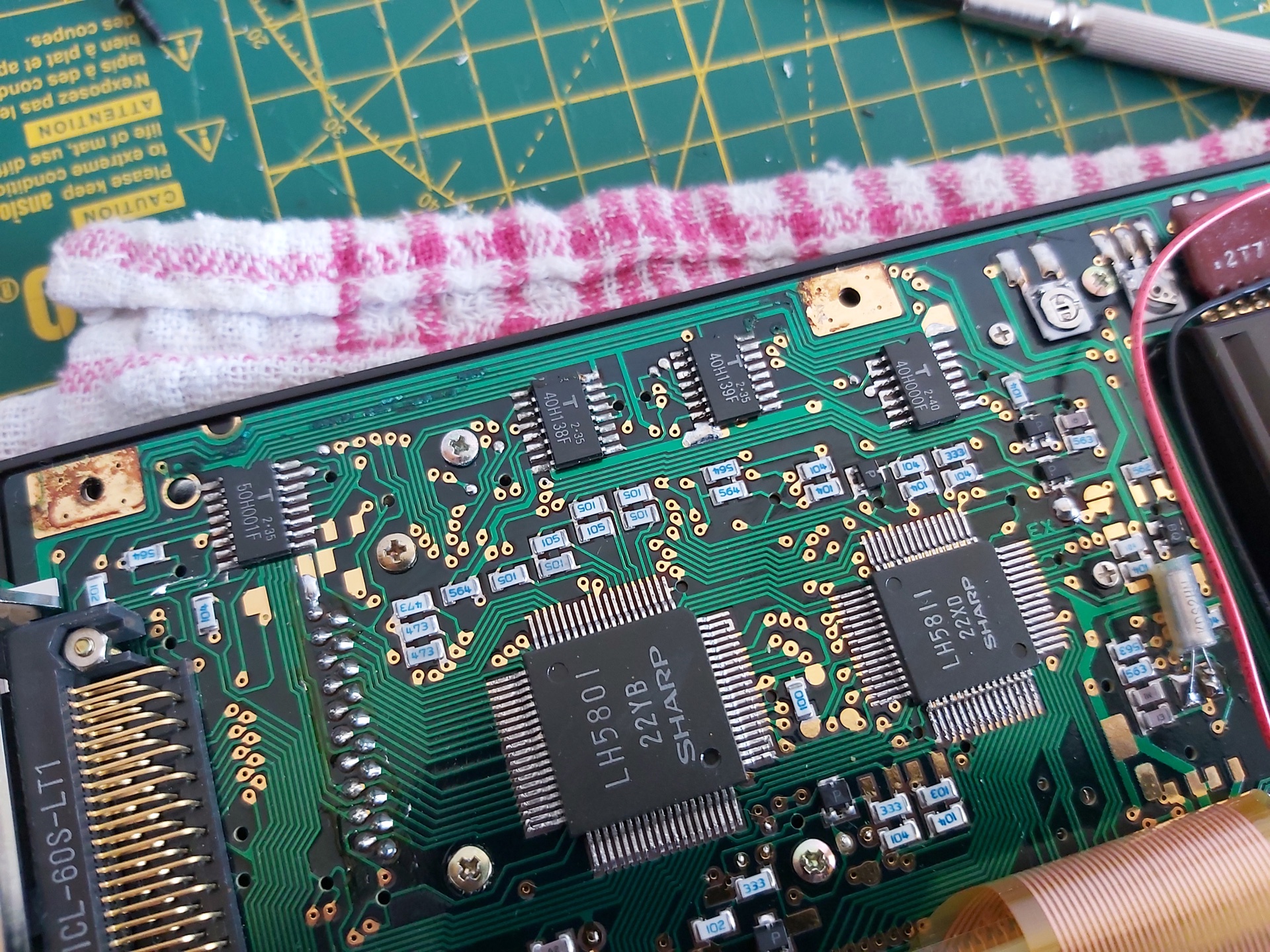

I cleaned up the rusty metal using some appliance descaler (and recorded a video of the process, which can be found on YouTube) then got to work with a scalpel and some fine enamelled copper wire to repair the damaged traces.


Thankfully when I put it all back together again I was greeted by the NEW0? :CHECK prompt, so I connected the computer to the CE-150 and confirmed I could save and load back programs using my PC in place of a cassette recorder. Hooray!

When looking to see what other people had managed to achieve with the computer I found the Sharp PC-1500 (TRS-80 PC-2) resource page which hosts several games and applications which can be downloaded in WAV format. I downloaded a few, but when playing them back on my PC the PC-1500 would refuse to load them. It could load from my own recordings, why not these?
The odd thing is that my own recordings started with a few seconds of constant pilot tone followed by the varying pulses of the program data I was trying to load. When playing back the downloaded recordings they'd start with silence and only make sound when they got to the actual data – and that data sounded quite unlike what my own recordings sounded like. What was going on? I opened a recording in Audacity to see what it looked like, and zoomed in:

That looks like the pilot tone, in that it alternates between high and low at a fixed frequency, though it's only one sample high then one sample low so is a square wave rather than the smooth sine wave I was expecting. The cassette format uses frequency-shift keying so I would expect to see data further on in the recording at half the frequency, or twice the period, i.e. two samples high and then two samples low. Scrolling along, I certainly find that:

Why does it look so spiky, though? It would only need to look like that if it had been sampled at an extremely low rate, and indeed that's what I found – these files are recorded at a 5kHz sample rate:

5kHz is a pretty unusual (and very low!) sample rate that I suspected my sound card was not handling particularly gracefully. Typically audio would need to be resampled to 44.1kHz or 48kHz before playing back, so I thought I'd try resampling in Audacity. This produced this weirdness:

Instead of a sine wave that alternates between two frequencies, I ended up with something more akin to an amplitude-modulated signal! The high-frequency pilot also disappears entirely, apart from what looks to be some initial ringing:

Now, this is a complete guess, but I suspect that what is happening is an attempt to reduce unpleasant harmonics in the resampled audio. A square wave (such as the one we're resampling) produces a lot of harmonics at higher frequencies. As the original audio was sampled at 5kHz, the highest frequency that this could represent was 2.5kHz (alternating high and low each sample, as per the pilot tone). A low-pass filter at 2.5kHz could therefore reduce the harmonics, though I'd still expect some of it to get through (rather than it being apparently being attenuated to zero in this case!) In any case, the signal is being destroyed by the resampling process, so it's no wonder the computer can't load the data.
So, what's the solution? A simpler resampling algorithm that just duplicates samples (a sort of "nearest neighbour") should give us an acceptable square wave when processing, however I could not find any way to achieve this natively in Audacity. Fortunately, though, there's a Nyquist Plugin script that can be used to repeat all samples (install via Tools→Nyquish Plugin Installer, then check it's listed in Tools→Plugin Manager – it will appear as Effect→Repeat Samples). As we want to end up around 44.1kHz the plugin can be used to repeat each sample eight times, which would take our 5kHz sample rate to 40kHz:

↓

When played back the pilot tone can finally be heard, but it's at much too low a pitch! This is because the samples have been repeated eight times, but the track's sample rate hasn't been increased to match. This can be done by right-clicking the track and selecting Rate→Other and entering 40kHz:

Now when the clip is played back it sounds as it should. As a further experiment, the sample rate could be changed from its somewhat odd 40kHz to a more conventional 44.1kHz via Tracks→Resample. When this is done, the nice clean square wave loses definition again:

As I mentioned earlier, square waves have a lot of harmonics, and the resampling process makes these harmonics extremely visible riding on top and bottom of each cycle of the square wave. There is one way to clean this up quite nicely, however – as we want to cull high-frequency harmonics, and as the original recording could only represent frequencies up to 2.5kHz we can apply a low-pass filter at 2.5kHz from the Effects menu:

↓

This resulting file sounds much better and loads into the computer as it should. It's a bit of a convoluted process, but it does at least bypass the resampling weirdness that distorts the original files in such a way that they can't be loaded. The only additional step I might recommend is to more neatly balance the signal around zero by normalising it as the first step:

In summary, the steps are as follows:
- Normalise the file (Effect→Normalize)
- Repeat all samples by 8× (Effect→Repeat Samples)
- Set track sample rate to 8× what it was (right-click, Rate→Other, multiply the value by 8)
- Resample to 44.1kHz (Tracks→Resample)
- Low-pass filter at 2.5kHz (Effect→Low-Pass Filter)
Happy tape loading!
Subscribe to an RSS feed that only contains items with the Sharp Pocket Computer tag.